
R21xx-HP FlexFabric 11900 Fundamentals Configuration Guide



156
Ste
p
Command
Remarks
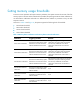
2. Specify a traffic load
sharing mode.
In standalone mode:
load-sharing mode { destination-ip
{ source-ip } | destination-mac
{ source-mac } | flexible |
ingress-port | source-ip
{ destination-ip } | source-mac
{ destination-mac } slot slot-number }
In IRF mode:
load-sharing mode { destination-ip
{ source-ip } | destination-mac
{ source-mac } | flexible |
ingress-port | source-ip
{ destination-ip } | source-mac
{ destination-mac } chassis
chassis-number slot slot-number }
By default, traffic load sharing is
performed per ingress port.
Enabling the port-down function globally
The port-down function shuts down all network ports immediately after all MPUs are removed or reboot
abnormally. This function does not work as long as the device has an active MPU.
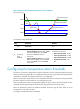
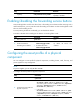
To enable the port-down function globally:
Ste
p
Command
Remarks
1. Enter system view.
system-view N/A
2. Enable the port-down function
globally.
monitor handshake-timeout
disable-port
By default, this function is
enabled.
Disabling password recovery capability
Password recovery capability controls console user access to the device configuration and SDRAM from
BootWare menus.
If password recovery capability is enabled, a console user can access the device configuration without
authentication and reconfigure the console login password and user privilege level passwords.
If password recovery capability is disabled, a console user must restore the factory-default configuration
before configuring new passwords. Restoring the factory-default configuration deletes the next-startup
configuration files.
To enhance system security, disable password recovery capability.
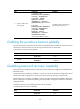
To disable password recovery capability:
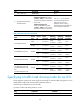
Step Command Remarks
1. Enter system view.
system-view N/A