
R21xx-HP FlexFabric 11900 Fundamentals Configuration Guide



158
Verifying and diagnosing transceiver modules
Verifying transceiver modules
You can use one of the following methods to verify the genuineness of a transceiver module:
• Display the key parameters of a transceiver module, including its transceiver type, connector type,
central wavelength of the transmit laser, transfer distance, and vendor name.
• Display its electronic label. The electronic label is a profile of the transceiver module and contains
the permanent configuration, including the serial number, manufacturing date, and vendor name.
The data is written to the storage component during debugging or testing.
To verify transceiver modules, execute the following commands in any view:
Task Command Remarks
Display key parameters
of transceiver modules.
display transceiver interface
[ interface-type interface-number ]
N/A
Display transceiver
modules' electrical
label information.
display transceiver manuinfo interface
[ interface-type interface-number ]
The electrical label information of a
transceiver module depends on the
model of the module.
Diagnosing transceiver modules
The device provides the alarm and digital diagnosis functions for transceiver modules. When a
transceiver module fails or is not operating correctly, you can check the alarms present on the transceiver
module to identify the fault source or you can examine the key parameters monitored by the digital
diagnosis function, including the temperature, voltage, laser bias current, TX power, and RX power.
To diagnose transceiver modules, execute the following command in any view:
Task Command Remarks
Display alarms present on
transceiver modules.
display transceiver alarm
interface [ interface-type
interface-number ]
N/A
Display the current measured values
of the digital diagnosis parameters
for transceiver modules.
display transceiver diagnosis
interface [ interface-type
interface-number ]
This command cannot display
information for some transceiver
modules.
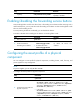
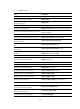
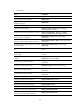
Displaying and maintaining device management
configuration
Execute display commands in any view and reset commands in user view.