
R21xx-HP FlexFabric 11900 Fundamentals Configuration Guide



162
Automatic configuration
With the automatic configuration feature, the device can automatically obtain a set of configuration
settings from some servers when it starts up without a configuration file. This feature simplifies network
configuration, facilitates centralized management, and reduces maintenance workload.
Automatic configuration cannot implement automatic IRF setup.
Understanding automatic configuration
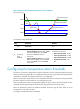
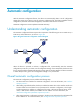
The automatic configuration feature requires the cooperation of the following servers: a DHCP server, a
TFTP server, and a DNS server, as shown in Figure 48.
Figure 48 Typical automatic configura
tion network diagram
When the device is powered on without a configuration file, it automatically starts the automatic
configuration process to try to obtain a set of configuration settings. If one attempt fails, the device waits
for two minutes and then automatically starts the process again for another attempt. The device continues
to make attempts until it gets a set of configuration settings or it is powered off.
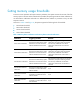
Overall automatic configuration process
The automatic configuration process includes the following steps:
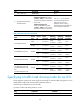
1. The device selects an interface for automatic configuration. For more information, see "Interface
selection process."
2. After finding a qualified interface, the device enables the DHCP client on the interface and tries to
locate a DHCP server and obtain a set of parameters for automatic configuration, which might
include a temporary IP address, a configuration file name, a TFTP server domain name, a host
name, a TFTP server IP address, and a DNS server IP address. For more information, see
"Automatic-configuration parameter acquisition process."
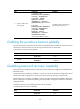
3. After getting automatic configuration parameters, the device tries to download a configuration file
from a TFTP server. For more information, see "Configuration file acquisition process."