
R21xx-HP FlexFabric 11900 Fundamentals Configuration Guide

163
4.
If the device gets a configuration file, it deletes its temporary settings to restore the factory defaults
and then executes the configuration file. Otherwise, the device deletes its temporary settings,
select another qualified interface, and repeats Step 2 to Step 4.
IMPORTANT:
• To ensure quick and successful automatic configuration of a device, connect only the interface used fo
r
automatic configuration to the network.
• The configuration file is deleted after being executed. After the device completes the automatic
configuration process, save the configuration by using the save command. Otherwise, the device has to
perform automatic configuration again after reboot. For more information about the save command,
see
Fundamentals Command Reference
.
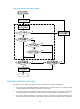
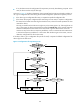
Figure 49 shows the automatic configuration workflow.