
R21xx-HP FlexFabric 11900 Fundamentals Configuration Guide

11
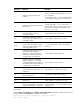
Characters Meanin
g
Exam
p
les
[ ]
Matches a single character in the
brackets.
"[16A]" matches a string containing 1, 6, or A;
"[1-36A]" matches a string containing 1, 2, 3, 6, or
A (- is a hyphen).
To match the character "]", put it immediately after
"[", for example [ ]string]. There is no such limit on
"[".
[^]
Matches a single character that is not in
the brackets.
"[^16A]" matches a string that contains at least one
character other than 1, 6, or A, such as "abc". A
match can also contain 1, 6, or A (such as "m16"),
but it cannot contain these three characters only
(such as 1, 16, or 16A).
{n}
Matches the preceding character n
times. The number n must be a
nonnegative integer.
"o{2}" matches "food", but not "Bob".
{n,}
Matches the preceding character n
times or more. The number n must be a
nonnegative integer.
"o{2,}" matches "foooood", but not "Bob".
{n,m}
Matches the preceding character n to m
times or more. The numbers n and m
must be nonnegative integers and n
cannot be greater than m.
" o{1,3}" matches "fod", "food", and "foooood",
but not "fd".
\<
Matches the beginning of a string. A
string that contains the pattern
following \< is also a match if the
characters preceding the pattern are
not digits, letters, or underscores.
"\<do" matches "domain" and "doa".
\>
Matches a string that ends with the
pattern preceding \>. A string that
contains the pattern is also a match if
the characters following the pattern are
not digits, letters, or underscores.
"do\>" matches "undo" and "cdo".
\b
Same as [^A-Za-z0-9_], matches a
character that is not a digit, letter, or
underscore.
"\ba" matches "-a", but not "2a" or "ba".
\B
Same as [A-Za-z0-9_], matches a digit,
letter, or underscore.
"\Bt" matches "install", but not "big top".
\w Same as \B. "v\w" matches "vlan" and "service".
\W Same as \b. "\Wa" matches "-a", but not "2a" or "ba".
\
Escape character. If a special character
listed in this table follows \, the specific
meaning of the character is removed.
"\\" matches a string containing "\", "\^" matches
a string containing "^", and "\\b" matches a string
containing "\b".
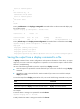
For example:
# Use | begin user-interface in the display current-configuration command to match the first line of
output that contains user-interface to the last line of output.
<Sysname> display current-configuration | begin user-interface
user-interface aux 1/1