
R21xx-HP FlexFabric 11900 Fundamentals Configuration Guide

14
Task Command
View and manage the output from a
display command effectively.
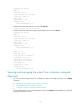
display command [ | [ by-linenum ] { begin | exclude | include }
regular-expression ] [ > filename | >> filename ]
For example:
# Save the running configuration to a separate file named test.txt, with each line numbered.
<Sysname> display current-configuration | by-linenum > test.txt
# Append lines including "snmp" in the running configuration to the file test.txt.
<Sysname> display current-configuration | include snmp >> test.txt
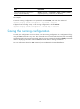
Saving the running configuration
To make your configuration survive a reboot, save the running configuration to a configuration file by
using the save command in any view. This command saves all commands that have been successfully
executed except for the one-time commands. Typical one-time commands include the display commands
used for displaying information and the reset commands used for clearing information.
For more information about the save command, see Fundamentals Command Reference.