
R21xx-HP FlexFabric 11900 Fundamentals Configuration Guide

21
A relative number uniquely identifies a user interface among all user interfaces that are the same type.
The number format is user interface type + number. Both types of user interfaces are numbered starting
from 0 and incrementing by 1. For example, the first VTY user interface is VTY 0.
Login authentication modes
You can configure login authentication to prevent illegal access to the device CLI.
The device supports the following login authentication modes:
• None—Disables authentication. This mode allows access without authentication and is insecure.
• Password—Requires password authentication.
• Scheme—Uses the AAA module to provide local or remote login authentication. You must provide
a username and password at login. If your password for remote authentication was lost, contact the
server administrator for help.
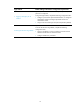
Different login authentication modes require different configurations on the user interfaces, as shown
in Table 8.
Table 8 Configuration required for
different login authentication modes
Authentication
mode
Configuration tasks
None Set the authentication mode to none.
Password
1. Set the authentication mode to password.
2. Set a password.
Scheme
3. Set the authentication mode to scheme.
4. Configure login authentication methods in ISP domain view. For more
information, see Security Configuration Guide.
User roles
A user is assigned one or more user roles at login, and a user can access only commands permitted by
the assigned user roles. For more information about user roles, see "Configuring RBAC."
The device assigns user roles based on the login authentication mode and login method:
• If none or password authentication is used, the device assigns user roles according to the user role
configuration made on the user interface.
• If scheme authentication is used:
{ For an SSH login user who uses publickey or password-publickey authentication, the device
assigns user roles according to the user role configuration made on the user interface.
{ For other users, the device assigns user roles according to the user role configuration made on
the AAA module. For remote AAA authentication users, if the AAA server does not assign any
user role to a user and the default user role function is disabled, the user cannot log in.