
R21xx-HP FlexFabric 11900 Fundamentals Configuration Guide

22
FIPS compliance
The device supports the FIPS mode that complies with NIST FIPS 140-2 requirements. Support for features,
commands, and parameters might differ in FIPS mode and non-FIPS mode. For more information about
FIPS mode, see Security Configuration Guide.
Telnet is not supported in FIPS mode.
Logging in through the console port locally
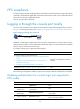
You can connect a terminal to the console port of the device to log in and manage the device, as shown
in Figure 8. F
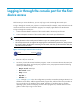
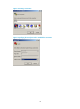
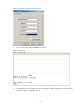
or the login procedure, see "5Logging in through the console port for the first device access."
Figure 8 Logging in through the console port
By default, console login is enabled and does not require authentication. To improve device security,
configure the password or scheme authentication mode and assign user roles as required immediately
after you log in to the device for the first time.
To configure console login, complete the following tasks:
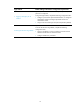
Task Remarks
(Required.) Configuring login authentication:
• Disabling authentication for console login (not supported in FIPS
mode)
• Configuring password authentication for console login (not
supported in FIPS mode)
• Configuring scheme authentication for console login
Configure one authentication mode as
required.
(Optional.) Configuring common AUX user interface settings N/A
The console login configuration is effective only for users who log in after the configuration is completed.
Disabling authentication for console login (not supported in
FIPS mode)
Ste
p
Command
Remarks
1. Enter system view.
system-view
N/A
2. Enter AUX user
interface view.
user-interface aux first-number
[ last-number ]
N/A
3. Disable
authentication.
authentication-mode none
By default, authentication is disabled for the
console login.
4. Assign a user role.
user-role role-name
By default, a console login user is assigned
the user role network-admin.