
R21xx-HP FlexFabric 11900 Fundamentals Configuration Guide

23
The next time you attempt to log in through the console, you do not need to provide any username or
password.
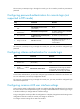
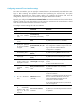
Configuring password authentication for console login (not
supported in FIPS mode)
Ste
p
Command
Remarks
1. Enter system view.
system-view N/A
2. Enter AUX user interface
view.
user-interface aux first-number
[ last-number ]
N/A
3. Enable password
authentication.
authentication-mode password
By default, authentication is disabled
for the console login.
4. Set a password.
set authentication password { hash |
simple } password
By default, no password is set.
5. Assign a user role.
user-role role-name
By default, a console login user is
assigned the user role
network-admin.
The next time you attempt to log in through the console port, you must provide the configured login
password.
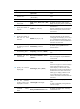
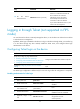
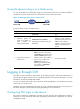
Configuring scheme authentication for console login
Ste
p
Command
Remarks
1. Enter system view.
system-view N/A
2. Enter AUX user
interface view.
user-interface aux first-number
[ last-number ]
N/A
3. Enable scheme
authentication.
authentication-mode scheme
In non-FIPS mode, authentication is
disabled for the console login by default.
In FIPS mode, scheme authentication is
enabled for the console login by default.
To use scheme authentication, you must also configure login authentication methods in ISP domain view.
For more information, see Security Configuration Guide.
The next time you attempt to log in through the console port, you must provide the configured login
username and password.
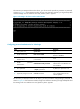
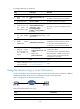
Configuring common AUX user interface settings
Some common settings configured for an AUX user interface take effect immediately and can interrupt
the current session. To avoid repeated re-logins, use a login method different from console login to log in
to the device before you change AUX user interface settings.
To log in through the console port after the configuration is complete, change the terminal settings on the
configuration terminal to match the console port settings on the device.
To configure common settings for an AUX user interface: