
R21xx-HP FlexFabric 11900 Fundamentals Configuration Guide

25
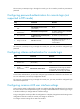
Ste
p
Command
Remarks
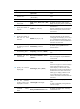
13. Set the session
idle-timeout timer.
idle-timeout minutes [ seconds ]
The default is 10 minutes.
If there is no interaction between the
device and the user within the
idle-timeout interval, the system
automatically terminates the user
connection on the user interface.
If you set the idle-timeout timer to 0, the
session will not be aged out.
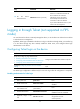
Logging in through Telnet (not supported in FIPS
mode)
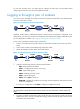
You can Telnet to the device to remotely manage the device, or use the device as a Telnet client to Telnet
to other devices to manage them.
By default, Telnet login is disabled on the device. To log in to the device through Telnet, you must first log
in to the device through any other method, enable the Telnet server, and configure Telnet login
authentication on the device.
Configuring Telnet login on the device
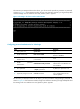
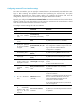
Task Remarks
(Required.) Configuring login authentication:
• Disabling authentication for Telnet login
• Configuring password authentication for Telnet login
• Configuring scheme authentication for Telnet login
Configure one authentication mode as required.
(Optional.) Configuring common VTY user interface
settings
N/A
The Telnet login configuration is effective only for users who log in after the configuration is completed.
Disabling authentication for Telnet login
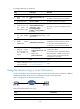
Ste
p
Command
Remarks
1. Enter system view.
system-view N/A
2. Enable Telnet server.
telnet server enable
By default, the Telnet server function is
disabled.
3. Enter one or multiple VTY
user interface views.
user-interface vty first-number
[ last-number ]
N/A
4. Disable authentication.
authentication-mode none
By default, password authentication is
enabled for VTY user interfaces.
5. (Optional.) Assign a user
role.
user-role role-name
By default, a VTY user interface user is
assigned the user role
network-operator.