
R21xx-HP FlexFabric 11900 Fundamentals Configuration Guide

30
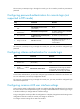
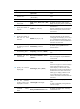
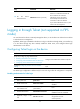
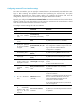
To configure SSH login on the device:
Ste
p
Command
Remarks
1. Enter system view.
system-view N/A
2. Create local key
pairs.
public-key local create { dsa |
rsa }
By default, no local key pairs are created.
3. Enable SSH server.
ssh server enable By default, SSH server is disabled.
4. Create an SSH user
and specify the
authentication mode.
ssh user username service-type
stelnet authentication-type
{ password | { any |
password-publickey |
publickey } assign publickey
keyname }
By default, no SSH user is configured on the
device.
5. Enter one or multiple
VTY user interface
views.
user-interface vty first-number
[ last-number ]
N/A
6. Enable scheme
authentication.
authentication-mode scheme
In non-FIPS mode, password authentication is
enabled for VTY user interfaces by default.
In FIPS mode, scheme authentication is
enabled for VTY user interfaces by default.
7. (Optional.) Specify
the protocols for the
user interfaces to
support.
• In non-FIPS mode:
protocol inbound { all | ssh
| telnet }
• In FIPS mode:
protocol inbound ssh
In non-FIPS mode, both Telnet and SSH are
supported by default.
In FIPS mode, SSH is supported by default.
This configuration is effective only for users
who log in to the user interfaces after the
configuration is completed.
8. Exit to system view.
quit N/A
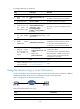
9. (Optional.) Configure
common settings for
VTY user interfaces.
See "Configuring common VTY
user interface s
ettings."
N/A
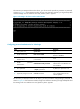
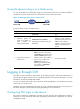
Using the device to log in to an SSH server
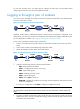
You can use the device as an SSH client to log in to an SSH server. If the server is located in a different
subnet than the device, make sure the two devices have routes to reach each other.
Figure 13 Logging in to an SSH client from the device
Perform the following tasks in user view:
Task Command
Log in to an IPv4 SSH server. ssh2 server
Log in to an IPv6 SSH server. ssh2 ipv6 server