
R21xx-HP FlexFabric 11900 Fundamentals Configuration Guide

32
6.
Launch the terminal emulation program on the PC and create a connection using the telephone
number of the device-side modem.
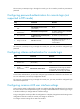
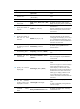
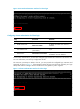
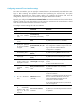
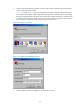
Figure 16 through Figure 19 show the
configuration procedure in Windows XP HyperTerminal.
On Windows Server 2003, add the HyperTerminal program first, and then log in to and manage
the device as described in this document. On Windows Server 2008, Windows 7, Windows Vista,
or another operating system, obtain a third-party terminal control program first, and then follow
the user guide or online help of that program to log in to the device.
Figure 16 Creating a connection
Figure 17 Configuring the dialing parameters
7. Dial the telephone number to establish a connection to the device.