
R21xx-HP FlexFabric 11900 Fundamentals Configuration Guide

34
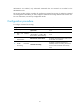
Displaying and maintaining CLI login
Execute display commands in any view and the other commands in user view.
Task Command
Remarks
Display information about
the user interfaces that are
being used.
display users N/A
Display information about
all user interfaces the
device supports.
display users all
N/A
Display user interface
information.
display user-interface [ num1 | { aux
| vty } num2 ] [ summary ]
N/A
Display the source IPv4
address or interface
configured for the device
to use for outgoing Telnet
packets when serving as a
Telnet client.
display telnet client
This command is not supported in FIPS
mode.
Release a user interface.
free user-interface { num1 | { aux |
vty } num2 }
Multiple users can log in to the device to
simultaneously configure the device.
When necessary, you can execute this
command to release some connections.
You cannot use this command to release
the connection you are using.
Lock the current user
interface.
lock
By default, the system does not lock any
user interface.
This command is not supported in FIPS
mode.
Send messages to user
interfaces.
send { all | num1 | { aux | vty }
num2 }
N/A