
R21xx-HP FlexFabric 11900 Fundamentals Configuration Guide

44
Assigning user roles
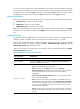
You assign access rights to users by assigning at least one user role. The users can use the collection of
commands and resources accessible to any user role assigned to them. For example, user role A denies
access to the qos apply policy command and permits access to only interface Ten-GigabitEthernet
1/0/1, and user role B permits access to the qos apply policy command and all interfaces. With these
two user roles, you can access any interface to use the qos apply policy command.
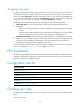
Depending on the authentication method, user role assignment has the following methods:
• AAA authorization—If scheme authentication is used, the AAA module handles user role
assignment.
{ If the user passes local authorization, the device assigns the user roles specified in the local user
account.
{ If the user passes remote authorization, the remote AAA server assigns the user roles specified
on the server to the user. The AAA server can be a RADIUS or HWTACACS server.
• None-AAA authorization—If the user uses password authentication or no authentication, the device
assigns user roles specified on the user interface. This method also applies to SSH clients that use
publickey or password-publickey authentication. User roles assigned to these SSH clients are
specified in their respective local management user accounts.
For more information about AAA and SSH, see Security Configuration Guide. For more information
about user interfaces, see "Login overview" and "L
ogging in to the CLI."
FIPS compliance
The device supports the FIPS mode that complies with NIST FIPS 140-2 requirements. Support for features,
commands, and parameters might differ in FIPS mode and non-FIPS mode. For more information about
FIPS mode, see Security Configuration Guide.
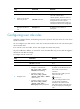
Configuration task list
Tasks at a glance
(Required.) Creating user roles
(Required.) Configuring user role rules
(Optional.) Configuring feature groups
(Optional.) Changing resource access policies
(Optional.) Assigning user roles
(Optional.) Configuring user role switching
Creating user roles
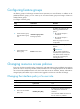
In addition to the predefined user roles, you can create up to 64 custom user roles for granular access
control.
To create a user role: