
R21xx-HP FlexFabric 11900 Fundamentals Configuration Guide

45
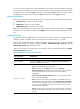
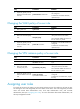
Ste
p
Command
Remarks
1. Enter system view.
system-view N/A
2. Create a user role and
enter user role view.
role name role-name
By default, the system has 18 predefined
user roles: network-admin,
network-operator, and level-n (where n
equals an integer in the range 0 to 15).
Among these user roles, only the
permissions and description of the user
roles level-0 to level-14 are configurable.
3. (Optional.) Configure a
description for the user
role.
description text
By default, a user role has no
description.
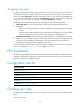
Configuring user role rules
Configure command, feature, and feature group rules to permit or deny the access of a user role to
specific commands.
You can configure up to 256 rules for a user role, but the total number of user role rules in the system
cannot exceed 1024.
If two rules of a user role conflict, the one with a higher rule number has priority.
Any rule modification, addition, or removal for a user role takes effect only on users that are logged in
with the user role after the change.
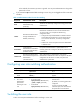
To configure rules for a user role:
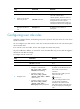
Ste
p
Command
Remarks
1. Enter system view.
system-view N/A
2. Enter user role view.
role name role-name N/A
3. Configure a rule.
• Configure a command rule:
rule number { deny | permit }
command command-string
• Configure a feature rule:
rule number { deny | permit }
{ execute | read | write } * feature
[ feature-name ]
• Configure a feature group rule:
rule number { deny | permit }
{ execute | read | write } *
feature-group feature-group-name
Configure at least one command.
By default, a user-defined user role
has no rules or access to any
command.
Repeat this step to add up to 256
rules to the user role.
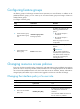
IMPORTANT:
When you configure feature rules,
you can specify only features
available in the system and must
enter feature names exactly the same
as they are displayed, including the
case.