
R21xx-HP FlexFabric 11900 Fundamentals Configuration Guide

47
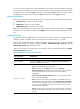
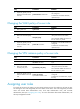
Ste
p
Command
Remarks
4. (Optional.) Specify a list of
interfaces accessible to the
user role.
permit interface interface-list
By default, no accessible interfaces
are configured.
To add more accessible interfaces,
repeat this step.
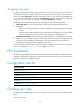
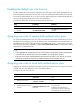
Changing the VLAN policy of a user role
Ste
p
Command
Remarks
1. Enter system view.
system-view N/A
2. Enter user role view.
role name role-name N/A
3. Enter user role VLAN policy
view.
vlan policy deny
By default, the VLAN policies of user
roles permit access to all VLANs.
This command disables the access of
the user role to any VLAN.
4. (Optional.) Specify a list of
VLANs accessible to the
user role.
permit vlan vlan-id-list
By default, no accessible VLANs are
configured.
To add more accessible VLANs,
repeat this step.
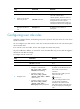
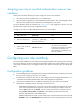
Changing the VPN instance policy of a user role
Ste
p
Command
Remarks
1. Enter system view.
system-view N/A
2. Enter user role view.
role name role-name N/A
3. Enter user role VPN
instance policy view.
vpn-instance policy deny
By default, the VPN policies of user
roles permit access to all VPNs.
This command disables the access of
the user role to any VPN.
4. (Optional.) Specify a list of
VPNs accessible to the user
role.
permit vpn-instance
vpn-instance-name&<1-10>
By default, no accessible VPNs are
configured.
To add more accessible VPNs, repeat
this step.
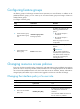
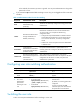
Assigning user roles
To control user access to the system, you must assign at least one user role. Make sure at least one user
role among the user roles assigned by the server exists on the device. User role assignment procedure
varies with remote AAA authentication users, local AAA authentication users, and non-AAA
authentication users (see "Assigning user roles")
. For more information about AAA authentication, see
Security Configuration Guide.