
R21xx-HP FlexFabric 11900 Fundamentals Configuration Guide

49
Assigning user roles to non-AAA authentication users on user
interfaces
Specify user roles for the following two types of login users on the user interfaces:
• Users that use password authentication or no authentication.
• SSH clients that use publickey or password-publickey authentication. User roles assigned to these
SSH clients are specified in their respective local management user accounts.
For more information about user interfaces, see "Login overview" and "L
ogging in to the CLI." For more
information about SSH, see Security Configuration Guide.
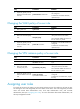
To assign a user role to non-AAA authentication users on a user interface:
Ste
p
Command
Remarks
1. Enter system view.
system-view N/A
2. Enter user interface view.
user-interface { first-num1
[ last-num1 ] | { aux | vty }
first-num2 [ last-num2 ] }
N/A
3. Specify a user role on the
user interface.
user-role role-name
Repeat this step to specify up to 64
user roles on a user interface.
By default, network-admin is specified
on the AUX user interface, and
network-operator is specified on any
other user interface.
Configuring user role switching
You can switch to a different user role without reconnecting to the device. This operation does not change
the user role settings in the user account that you have been logged in with, and it is effective only on the
current login. The next time you are logged in with the user account, the original user role settings take
effect.
Configuration guidelines
• If no switching password is configured in the local password authentication, an AUX user can switch
the user role by entering any string or even nothing.
• To enable users to switch the user role, you must configure user role switching authentication. Table
10 de
scribes the available authentication modes and configuration requirements.
• Local password authentication is available for switching to any user role, but remote AAA
authentication is available only for switching to a level-n user role.
{ If HWTACACS authentication is used, use a user account that has the target user role level or
a user role level higher than the target user role for role switching. For example, if the user
account test has the user role level-3, you can use this user account to switch the user role
among level-0, level-1, level-2, and level-3. In this method, you must enter the correct
username and password to pass authentication.
{ If RADIUS authentication is used, you must create a user account for each level-n user role in the
$enabn$ format or the $enabn$@domain-name format, where n represents the user role level.