
R21xx-HP FlexFabric 11900 Fundamentals Configuration Guide


56
# Verify that you cannot configure any interface except Ten-GigabitEthernet 1/0/1 to
Ten-GigabitEthernet 1/0/24. Take Ten-GigabitEthernet 1/0/2 and Ten-GigabitEthernet 1/0/25 as
examples.
[Switch] vlan 10
[Switch-vlan10] port ten-gigabitethernet 1/0/2
[Switch-vlan10] port ten-gigabitethernet 1/0/25
Permission denied.
RBAC configuration example for HWTACACS authentication
users
Unless otherwise noted, devices in the configuration example are operating in non-FIPS mode.
Network requirements
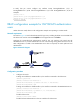
The switch in Figure 25 uses local authentication for login users, including the Telnet user at 192.168.1.58.
This Telnet user uses the username test@bbb and is assigned the user role level-0.
Configure the remote-then-local authentication mode for user role switching. The switch uses the
HWTACACS server to provide authentication for user role switching among level-0 and level-3. If the
AAA configuration is invalid or the HWTACACS server does not respond, the switch performs local
authentication.
Figure 25 Network diagram
Configuration procedure
1. Configure the switch:
# Assign an IP address to VLAN-interface 2, the interface connected to the Telnet user.
<Switch> system-view
[Switch] interface vlan-interface 2
[Switch-Vlan-interface2] ip address 192.168.1.70 255.255.255.0
[Switch-Vlan-interface2] quit
# Assign an IP address to VLAN-interface 3, the interface connected to the HWTACACS server.
[Switch] interface vlan-interface 3
[Switch-Vlan-interface3] ip address 10.1.1.2 255.255.255.0
[Switch-Vlan-interface3] quit
# Enable Telnet server.
[Switch] telnet server enable
# Enable scheme authentication on the user interfaces for Telnet users.