
R21xx-HP FlexFabric 11900 Fundamentals Configuration Guide

63
FTP server configuration example (in standalone mode)
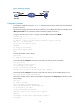
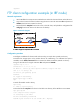
Network requirements
Create a local user account with username abc and password 123456 on the FTP server. Use the user
account to log in to the FTP server from the FTP client, upload the file temp.bin from the FTP client to the
FTP server, and download the configuration file startup.cfg from the FTP server to the FTP client for
backup.
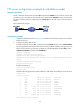
Figure 28 Network diagram
Configuration procedure
1. Configure IP addresses as shown in Figure 28, and make sure the device and PC can reach other.
(Details not shown.)
2. Configure the device (FTP server):
# Create a local user account abc, set the password to 123456, the user role to network-admin,
the working directory to the Flash root directory of the active MPU, and the service type to FTP. (To
set the working directory to the Flash root directory of the standby MPU, replace flash:/ in the
authorization-attribute command with slot1#flash:/.)
<Sysname> system-view
[Sysname] local-user abc class manage
[Sysname-luser-abc] password simple 123456
[Sysname-luser-abc] authorization-attribute user-role network-admin work-directory
flash:/
[Sysname-luser-abc] service-type ftp
[Sysname-luser-abc] quit
# Enable the FTP server.
[Sysname] ftp server enable
[Sysname] quit
# Examine the storage space for space insufficiency and delete unused files for more free space.
<Sysname> dir
Directory of flash:
0 -rw- 0 Sep 27 2010 14:43:34 kernel.bin
1 -rw- 0 Sep 27 2010 14:43:34 base.bin
2 drw- - Jun 29 2011 18:30:38 logfile
3 drw- - Jun 21 2011 14:51:38 diagfile
4 drw- - Jun 21 2011 14:51:38 seclog
5 -rw- 2943 Jul 02 2011 08:03:08 startup.cfg
6 -rw- 63901 Jul 02 2011 08:03:08 startup.mdb
7 -rw- 716 Jun 21 2011 14:58:02 hostkey
8 -rw- 572 Jun 21 2011 14:58:02 serverkey
9 -rw- 6541264 Aug 04 2011 20:40:49 backup.bin
503808 KB total (467080 KB free)