
R21xx-HP FlexFabric 11900 Fundamentals Configuration Guide

66
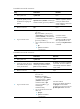
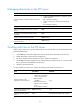
To establish an IPv4 FTP connection:
Ste
p
Command
Remarks
1. Enter system view. system-view N/A
2. (Optional.) Specify a source
IP address for outgoing FTP
packets.
ftp client source { interface interface-type
interface-number | ip source-ip-address }
By default, no source IP
address is specified, and the
primary IP address of the
output interface is used as the
source IP address.
3. Return to user view.
quit N/A
4. Log in to the FTP server.
• Log in to the FTP server directly from
user view:
ftp server-address [ service-port ]
[ vpn-instance vpn-instance-name ]
[ source { interface { interface-name
| interface-type interface-number } |
ip source-ip-address } ]
• Log in to the FTP server from FTP client
view:
a. ftp
b. open server-address
[ service-port ]
Use either method.
The source IP address
specified in the ftp command
takes precedence over the
one set by the ftp client source
command.
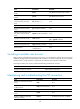
To establish an IPv6 FTP connection:
Ste
p
Command
Remarks
1. Enter system view. system-view N/A
2. (Optional.) Specify the source
IPv6 address for FTP packets
sent by the FTP client.
ftp client ipv6 source { interface
interface-type interface-number |
ipv6 source-ipv6-address }
By default, no source IPv6 address
is specified. The source address is
automatically selected as defined
in RFC 3484.
3. Return to user view. quit N/A
4. Log in to the FTP server.
• Log in to the FTP server directly
from user view:
ftp ipv6 server-address
[ service-port ] [ vpn-instance
vpn-instance-name ] [ source
{ interface interface-type
interface-number | ipv6
source-ipv6-address } ] [ -i
interface-type
interface-number ]
• Log in to the FTP server from FTP
client view:
a. ftp ipv6
b. open server-address
[ service-port ]
Use either method.
The source IP address specified in
the ftp ipv6 command takes
precedence over the one set by the
ftp client ipv6 source command.