
R21xx-HP FlexFabric 11900 Fundamentals Configuration Guide

83
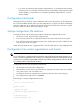
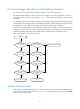
c.
If you have not specified a backup startup configuration file, or the specified backup startup
configuration file is not available, the device starts up with the default configuration file (called
"factory defaults"). If a parameter is not included in the default configuration file, its initial
setting is loaded.
Configuration file formats
Configuration files you specify for saving configuration must use the .cfg extension. A .cfg configuration
file is a human-readable text file. When you save configuration to a .cfg file, the device automatically
saves the configuration to an .mdb user-inaccessible binary file that has the same name as the .cfg file.
The device loads an .mdb file faster than loading a .cfg file.
Startup configuration file selection
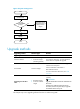
At startup, the device uses the following procedure to identify the configuration file to load:
1. Searches for a valid .cfg next-startup configuration file.
2. If one is found, searches for an .mdb file that has the same name and content as the .cfg file.
3. If an .mdb file has the same name and content as the .cfg file, starts up with the .mdb file. If none
is found, starts up with the .cfg file.
Unless otherwise stated, the term "configuration file" in this document refers to a .cfg configuration file.
Configuration file content organization and format
IMPORTANT:
To run on the device, a confi
g
uration file must meet the content and format requirements of the device. To
ensure a successful configuration load at startup, use a configuration file that was automatically created
on the device or created by using the save command. If you edit the confi
g
uration file, make sure all edits
are compliant with the requirements of the device.
A configuration file must meet the following requirements:
• All commands are saved in their complete form.
• Commands are sorted in sections by command view, typically in this order: system view, interface
view, protocol views, and user interface view.
• Two adjacent sections are separated by a comment line that starts with a pound sign (#).
• The configuration file ends with the word return.
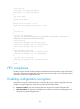
The following is a sample configuration file excerpt:
#
version 7.1.035, Release 2105
#
sysname sysname
#
command-alias enable
command-alias mapping display show
#
ip vpn-instance vpn1
route-distinguisher 105:1