
R21xx-HP FlexFabric 11900 Fundamentals Configuration Guide


86
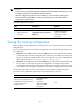
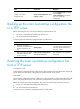
Task Command Remarks
Save the running configuration to a
configuration file in the root directory
of each MPU's flash and specify the
file as a startup configuration file.
save [ safely ] [ backup | main ]
[ force ]
If you execute the save [ safely ]
command without specifying
any other keyword, the
command saves the
configuration to the main startup
configuration file.
If the force keyword is specified,
the command saves the
configuration to the next-startup
configuration file that has been
specified.
If the force keyword is not
specified, you can choose to
re-specify a next-startup
configuration file as instructed
by the system.
Specifying a next-startup configuration file
CAUTION:
In an IRF fabric, use the undo startup saved-configuration command with caution. This command can
cause an IRF split after the IRF fabric or an IRF member reboots.
You can specify a .cfg configuration file as a main or backup next-startup configuration file when using
the save [ safely ] [ backup | main ] [ force ] command to save the running configuration.
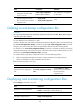
Alternatively, you can execute the startup saved-configuration cfgfile [ backup | main ] command to
specify a configuration file as the main or backup next-startup configuration file. When performing this
task, follow these guidelines:
• In standalone mode, make sure the specified configuration file is valid and saved to the root
directory of both active and standby MPUs' flashes.
• In IRF mode, make sure the specified configuration file is valid and saved to the root directory of all
MPUs' flashes in the IRF fabric.
• If neither backup nor main is specified, this command sets the configuration file as the main
next-startup configuration file.
• Even though the main and backup next-startup configuration files can be the same one, specify
them as separate files for high availability.
• The undo startup saved-configuration command changes the attribute of the main or backup
next-startup configuration file to NULL instead of deleting the file.
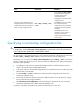
To specify a next-startup configuration file, perform the following task in user view: