
R21xx-HP FlexFabric 11900 Fundamentals Configuration Guide


87
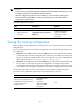
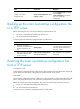
Task Command Remarks
Specify a next-startup
configuration file.
startup saved-configuration cfgfile
[ backup | main ]
Use the display startup command
and the display
saved-configuration command in
any view to verify the
configuration.
Backing up the main next-startup configuration file
to a TFTP server
Before performing this task, make sure the following requirements are met:
• The server is reachable and enabled with TFTP service.
• You have read and write permissions.
To back up the main next-startup configuration file to a TFTP server:
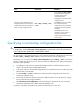
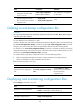
Step Command Remarks
1. (Optional.) Verify that a
next-startup configuration file
has been specified in user
view.
display startup
If no next-startup configuration file
has been specified, the backup
operation will fail.
2. Back up the main next-startup
configuration file to a TFTP
server in user view.
backup startup-configuration to
dest-addr [dest-filename ]
This command is not supported in
FIPS mode.
Restoring the main next-startup configuration file
from a TFTP server
In standalone mode:
To download a configuration file from a TFTP server to the root directory of each MPU's flash, and specify
the file as the main next-startup configuration file, perform the task in this section.
In IRF mode:
To download a configuration file from a TFTP server to the root directory of each MPU's flash in the IRF
fabric, and specify the file as the main next-startup configuration file, perform the task in this section.
Before restoring the next-startup configuration file, make sure the following requirements are met:
• The server is reachable and enabled with TFTP service.
• You have read and write permissions.
To restore the main next-startup configuration file from a TFTP server: