
R21xx-HP FlexFabric 11900 Fundamentals Configuration Guide

88
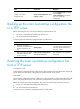
Step Command Remarks
1. Restore the main next-startup
configuration file from a TFTP
server in user view.
restore startup-configuration
from src-addr src-filename
This command is not supported
in FIPS mode.
2. (Optional.) Verify that the
specified configuration file has
been set as the main next-startup
configuration file.
• display startup
• display saved-configuration
N/A
Deleting a next-startup configuration file
CAUTION:
This task permanently deletes the next-startup configuration file from each MPU. Before performing this
task, back up the file as needed.
You can delete the main, the backup, or both.
To delete a file that is set as both main and backup next-startup configuration files, you must execute both
the reset saved-configuration backup command and the reset saved-configuration main command.
Using only one of the commands removes the specified file attribute instead of deleting the file.
For example, if the reset saved-configuration backup command is executed, the backup next-startup
configuration file setting is set to NULL, but the file is still used as the main file. To delete the file, you must
also execute the reset saved-configuration main command.
You need to delete a next-startup configuration file for one of the following reasons:
• After you upgrade system software, the file no longer matches the new system software.
• The file is corrupted or not fully compatible with the device.
Perform the following task in user view:
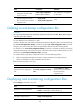
Task Command Remarks
Delete next-startup configuration
files.
reset saved-configuration [ backup |
main ]
If neither backup nor main is
specified, this command deletes
the main next-startup
configuration file.
Displaying and maintaining configuration files
Execute display commands in any view.
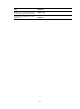
Task Command
Display the running configuration.
display current-configuration [ configuration [ module-name ] |
interface [ interface-type [ interface-number ] ] ]
Display the factory defaults. display default-configuration
Display the contents of the main
next-startup configuration file.
display saved-configuration