
R21xx-HP FlexFabric 11900 High Availability Configuration Guide

95
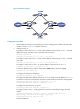
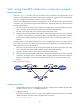
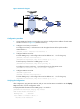
Figure 26 Network diagram
Configuration procedure
1. Create VLANs and assign corresponding ports to them. Configure the IP address of each VLAN
interface as shown in Figure 26. (Details not shown.)
2. Configure a track entry on Switch A:
# Configure track entry 1 and associate it with the physical status of the uplink interface
VLAN-interface 3.
[SwitchA] track 1 interface vlan-interface 3
3. Configure VRRP on Switch A:
# Create VRRP group 1 and configure the virtual IP address 10.1.1.10 for the group.
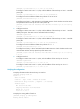
[SwitchA] interface vlan-interface 2
[SwitchA-Vlan-interface2] vrrp vrid 1 virtual-ip 10.1.1.10
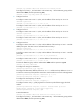
# Set the priority of Switch A in VRRP group 1 to 110.
[SwitchA-Vlan-interface2] vrrp vrid 1 priority 110
# Configure to monitor track entry 1, and specify the priority decrement as 30.
[SwitchA-Vlan-interface2] vrrp vrid 1 track 1 reduced 30
4. Configure VRRP on Switch B:
<SwitchB> system-view
[SwitchB] interface vlan-interface 2
# Create VRRP group 1 and configure the virtual IP address 10.1.1.10 for the group.
[SwitchB-Vlan-interface2] vrrp vrid 1 virtual-ip 10.1.1.10
Verifying the configuration
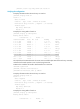
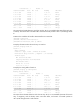
After configuration, ping Host B on Host A, and you can see that Host B is reachable. Use the display
vrrp command to view the configuration result.
# Display detailed information about VRRP group 1 on Switch A.
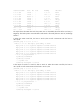
[SwitchA-Vlan-interface2] display vrrp verbose
IPv4 Virtual Router Information:
Running Mode : Standard
Total number of virtual routers : 1
Interface Vlan-interface2