
R21xx-HP FlexFabric 11900 High Availability Configuration Guide

8
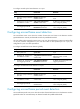
Ste
p
Command
Remarks
3. Configure the errored frame
seconds event triggering
threshold.
oam global errored-frame-seconds
threshold threshold-value
By default, the errored frame
seconds event triggering
threshold is 1.
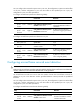
To configure errored frame seconds event detection on a port:
Ste
p
Command
Remarks
1. Enter system view.
system-view N/A
2. Enter Layer 2/Layer 3 Ethernet
port view.
interface interface-type
interface-number
N/A
3. Configure the errored frame
seconds event detection
window.
oam errored-frame-seconds
window window-value
By default, an interface uses the
value configured globally.
4. Configure the errored frame
seconds event triggering
threshold.
oam errored-frame-seconds
threshold threshold-value
By default, an interface uses the
value configured globally.
Configuring the action a port takes after it receives
an Ethernet OAM event from the remote end
This feature enables a port to log events and automatically terminate the OAM connection and set the
link state to down.
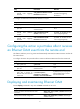
To configure the action the port takes after it receives an Ethernet OAM event from the remote end:
Ste
p
Command
Remarks
1. Enter system view.
system-view N/A
2. Enter Layer 2/Layer 3 Ethernet
port view.
interface interface-type
interface-number
N/A
3. Configure the action the port
takes after it receives an
Ethernet OAM event from the
remote end.
oam remote-failure
{ connection-expired |
critical-event | dying-gasp |
link-fault } action error-link-down
By default, the port only logs the
Ethernet OAM event it receives
from the remote end.
Displaying and maintaining Ethernet OAM
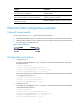
Execute display commands in any view and reset commands in user view:
Pur
p
ose Command
Display information about an Ethernet OAM
connection.
display oam { local | remote } [ interface interface-type
interface-number ]
Display Ethernet OAM configuration.
display oam configuration [ interface interface-type
interface-number ]