
R21xx-HP FlexFabric 11900 High Availability Configuration Guide

16
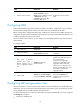
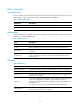
Ste
p
Command
Remarks
3. Create a service instance.
cfd service-instance instance-id
ma-id { icc-based icc-name |
integer ma-num | string ma-name
| vlan-based [ vlan-id ] }
[ ma-index index-value ] md
md-name [ vlan vlan-id ]
By default, no service instance
exists.
Configuring MEPs
CFD is implemented through various operations on MEPs. As a MEP is configured on a service instance,
the MD level and VLAN attribute of the service instance become the attribute of the MEP.
Before creating MEPs, configure the MEP list first. A MEP list is a collection of local MEPs allowed to be
configured in an MA and the remote MEPs to be monitored. You cannot create a MEP if the MEP ID is not
included in the MEP list of the service instance.
On the same level of an interface, you can configure an outward-facing MEP for only one MA with no
VLAN attribute.
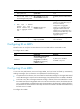
To configure a MEP:
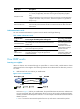
Ste
p
Command
Remarks
1. Enter system view. system-view N/A
2. Configure a MEP list.
cfd meplist mep-list
service-instance instance-id
By default, no MEP list is
configured.
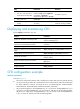
3. Enter Layer 2 Ethernet
interface view, Layer 3
Ethernet interface view, or
Layer 2 aggregate interface
view.
interface interface-type
interface-number
Configurations in Ethernet
interface view take effect only on
the current interface;
configurations in aggregate
interface view take effect on the
aggregate interface and all its
member ports; configurations on a
member port take effect only when
the member port leaves the
aggregation group.
4. Create a MEP.
cfd mep mep-id service-instance
instance-id { inbound | outbound }
By default, no MEP is configured.
The keyword inbound is not
supported in Layer 3 Ethernet
interface view.
Configuring MIP auto-generation rules
As functional entities in a service instance, MIPs respond to various CFD frames, such as LTM frames and
LBM frames. You can choose appropriate MIP generation rules based on your network design, and the
system automatically creates MIPs based on the specified rule.
Any of the following actions or cases can cause MIPs to be created or deleted after you have configured
the cfd mip-rule command:
• Enabling or disabling CFD.