
R21xx-HP FlexFabric 11900 High Availability Configuration Guide

27
Detecting multiple neighbors
When multiple devices are connected through a hub, enable DLDP on all interfaces connected to the hub
to detect unidirectional links among the neighbors. When no Confirmed neighbor exists, an interface
enters the Unidirectional state.
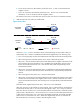
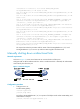
Figure 9 Network diagram
As shown in Figure 9, Device A through Device D are connected through a hub, and enabled with DLDP.
When Port 1, Port 2, and Port 3 detect that the link to Port 4 fails, they deletes the neighborship with Port
4, but stay in Bidirectional state.
Configuration restrictions and guidelines
For DLDP to operate correctly, enable DLDP on both sides and make sure these settings are consistent: the
interval to send Advertisement packets, DLDP authentication mode, and password.
DLDP configuration task list
Tasks at a
g
lance
(Required.) Enabling DLDP
(Optional.) Setting the interval to send advertisement packets
(Optional.) Setting the DelayDown timer
(Optional.) Setting the port shutdown mode
(Optional.) Configuring DLDP authentication
Configuration prerequisites
Configure the full duplex mode for the ports at two ends of the link, and configure a speed for the two
ports, rather than letting them negotiate a speed.