
R21xx-HP FlexFabric 11900 High Availability Configuration Guide

33
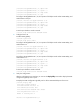
<DeviceA>%Jul 11 17:42:57:709 2012 DeviceA IFNET/3/PHY_UPDOWN:
Ten-GigabitEthernet1/0/1 link status is DOWN.
%Jul 11 17:42:58:603 2012 DeviceA IFNET/3/PHY_UPDOWN: Ten-GigabitEthernet1/0/2 link
status is DOWN.
%Jul 11 17:43:02:342 2012 DeviceA IFNET/3/PHY_UPDOWN: Ten-GigabitEthernet1/0/1 link
status is UP.
%Jul 11 17:43:02:343 2012 DeviceA DLDP/6/DLDP_NEIGHBOR_CONFIRMED: A neighbor was
confirmed on interface Ten-GigabitEthernet1/0/1. The neighbor's system MAC is
0023-8956-3600, and the port index is 1.
%Jul 11 17:43:02:344 2012 DeviceA DLDP/6/DLDP_LINK_BIDIRECTIONAL: DLDP detected a
bidirectional link on interface Ten-GigabitEthernet1/0/1.
%Jul 11 17:43:02:353 2012 DeviceA IFNET/5/LINK_UPDOWN: Line protocol on the interface
Ten-GigabitEthernet1/0/1 is UP.
%Jul 11 17:43:02:357 2012 DeviceA IFNET/3/PHY_UPDOWN: Ten-GigabitEthernet1/0/2 link
status is UP.
%Jul 11 17:43:02:362 2012 DeviceA DLDP/6/DLDP_NEIGHBOR_CONFIRMED: A neighbor was
confirmed on interface Ten-GigabitEthernet1/0/2. The neighbor's system MAC is
0023-8956-3600, and the port index is 2.
%Jul 11 17:43:02:362 2012 DeviceA DLDP/6/DLDP_LINK_BIDIRECTIONAL: DLDP detected a
bidirectional link on interface Ten-GigabitEthernet1/0/2.
%Jul 11 17:43:02:368 2012 DeviceA IFNET/5/LINK_UPDOWN: Line protocol on the interface
Ten-GigabitEthernet1/0/2 is UP.
The output shows that the port status and link status of both Ten-GigabitEthernet 1/0/1 and
Ten-GigabitEthernet 1/0/2 are now up and their DLDP neighbors are determined.
Manually shutting down unidirectional links
Network requirements
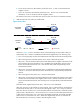
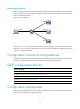
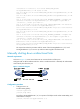
As shown in Figure 11, Device A and Device B are connected with two fiber pairs.
Configure DLDP to detect unidirectional links. When a unidirectional link is detected, the administrator
must manually shut down the port.
Figure 11 Network diagram
Configuration procedure
1. Configure Device A:
# Enable DLDP globally.
<DeviceA> system-view
[DeviceA] dldp enable
# Configure Ten-GigabitEthernet 1/0/1 to operate in full duplex mode and at 10000 Mbps, and
enable DLDP on the port.
[DeviceA] interface ten-gigabitethernet 1/0/1