
R21xx-HP FlexFabric 11900 High Availability Configuration Guide

43
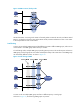
• VRRP group 1—Router A is the master. Router B and Router C are the backups.
• VRRP group 2—Router B is the master. Router A and Router C are the backups.
• VRRP group 3—Router C is the master. Router A and Router B are the backups.
To implement load sharing among Router A, Router B, and Router C, hosts on the subnet must be
configured with the virtual IP addresses of VRRP group 1, 2, and 3 as default gateways, respectively.
When you configure them, make sure that each router is assigned an appropriate priority in each VRRP
group so that each router can take the expected role in each group.
Protocols and standards
• RFC 3768, Virtual Router Redundancy Protocol (VRRP)
• RFC 5798, Virtual Router Redundancy Protocol (VRRP) Version 3 for IPv4 and IPv6
Configuring IPv4 VRRP
IPv4 VRRP configuration task list
Tasks at a
g
lance
Remarks
(Optional.) Specifying the IPv4 VRRP version N/A
(Required.) Creating a VRRP group and
assigning a virtual IP address
N/A
(Optional.) Configuring the router priority,
preemptive mode, and tracking function
N/A
(Optional.) Configuring IPv4 VRRP packet
attributes
N/A
(Optional.) Disabling an IPv4 VRRP group N/A
Specifying the IPv4 VRRP version
The VRRP version on all routers in an IPv4 VRRP group must be the same.
To specify the version of IPv4 VRRP:
Ste
p
Command
Remarks
1. Enter system view.
system-view N/A
2. Enter interface view.
interface interface-type interface-number N/A
3. Specify the version of
VRRP.
vrrp version version-number By default, VRRPv3 is used.
Creating a VRRP group and assigning a virtual IP address
A VRRP group can operate correctly after you create it and assign at least one virtual IP address to it. You
can configure multiple virtual IP addresses for the VRRP group on an interface that connects to multiple
subnets for router backup on different subnets.