
R21xx-HP FlexFabric 11900 High Availability Configuration Guide

46
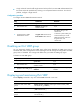
Ste
p
Command
Remarks
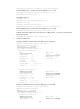
5. Enable TTL check for IPv4
VRRP packets.
vrrp check-ttl enable
By default, TTL check for IPv4 VRRP
packets is enabled.
Disabling an IPv4 VRRP group
You can temporarily disable an IPv4 VRRP group. After being disabled, the VRRP group stays in
initialized state, and its configurations remain unchanged. You can change the configuration of a VRRP
group when the VRRP group is disabled. Your changes take effect when you enable the VRRP group
again.
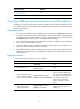
To disable an IPv4 VRRP group:
Ste
p
Command
Remarks
1. Enter system view.
system-view N/A
2. Enter interface view.
interface interface-type
interface-number
N/A
3. Disable a VRRP group.
vrrp vrid virtual-router-id shutdown
By default, a VRRP group is
enabled.
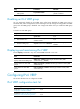
Displaying and maintaining IPv4 VRRP
Execute display commands in any view and the reset command in user view.
Task Command
Display states of IPv4 VRRP groups.
display vrrp [ interface interface-type interface-number [ vrid
virtual-router-id ] ] [ verbose ]
Display statistics for IPv4 VRRP
groups.
display vrrp statistics [ interface interface-type interface-number [ vrid
virtual-router-id ] ]
Clear statistics for IPv4 VRRP
groups.
reset vrrp statistics [ interface interface-type interface-number [ vrid
virtual-router-id ] ]
Configuring IPv6 VRRP
This section describes how to configure IPv6 VRRP.
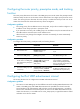
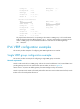
IPv6 VRRP configuration task list
Tasks at a
g
lance
Remarks
(Required.) Creating a VRRP group and
assigning a virtual IPv6 address
N/A
(Optional.) Configuring the router priority,
preemptive mode, and tracking function
N/A