
R21xx-HP FlexFabric 11900 High Availability Configuration Guide

48
Configuring the router priority, preemptive mode, and tracking
function
The router priority determines which router in the VRRP group serves as the master. The preemptive mode
enables a backup to take over as the master when it detects that it has a higher priority than the current
master. The tracking function decreases the router priority or enables the backup to take over as the
master when the state of the monitored track entry transits to Negative.
Configuration guidelines
• The running priority of an IP address owner is always 255, and you do not need to configure it. An
IP address owner always operates in preemptive mode.
• If you associate a track entry with a VRRP group on an IP address owner, the association does not
take effect until the router becomes a non-IP address owner.
• When the track entry changes from Negative to Positive or Notready, the router automatically
restores its priority.
Configuration procedure
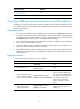
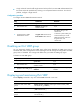
To configure the router priority, preemptive mode, and tracking function:
Ste
p
Command
Remarks
1. Enter system view.
system-view N/A
2. Enter interface view.
interface interface-type
interface-number
N/A
3. Configure the priority of the
router in the VRRP group.
vrrp ipv6 vrid virtual-router-id
priority priority-value
The default setting is 100.
4. Enable the preemptive mode
for the router in a VRRP group
and configure the preemption
delay time.
vrrp ipv6 vrid virtual-router-id
preempt-mode [ delay
delay-value ]
By default, the router in a VRRP
group operates in preemptive
mode and the preemption delay
time is 0 seconds, which means an
immediate preemption.
5. Associate a VRRP group with
a track entry.
vrrp ipv6 vrid virtual-router-id track
track-entry-number [ reduced
priority-reduced | switchover ]
By default, a VRRP group is not
associated with any track entry.
Configuring the IPv6 VRRP advertisement interval
This section describes how to configure the IPv6 VRRP advertisement interval.
Configuration guidelines
• The routers in an IPv6 VRRP group can have different intervals for sending VRRP advertisements. The
master in the VRRP group sends VRRP advertisements at the specified interval and carries the
interval attribute in the advertisements. After a backup receives the advertisement, it records the
interval in the advertisement. If the backup does not receive a new VRRP advertisement from the
master when the timer (3 x recorded interval + Skew_Time) expires, it regards the master as failed
and takes over as the new master.