
R21xx-HP FlexFabric 11900 High Availability Configuration Guide

72
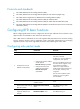
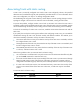
Ste
p
Command
Remarks
1. Enter system view.
system-view N/A
2. Create a track entry,
associate it with the BFD
session, and specify the delay
time for the Track module to
notify the associated
application module when the
track entry status changes.
track track-entry-number bfd { control |
echo } interface interface-type
interface-number remote ip remote-ip local
ip local-ip [ delay { negative negative-time |
positive positive-time } * ]
No track entry is created
by default.
Do not configure the
virtual IP address of a
VRRP group as the local or
remote address of a BFD
session.
Associating Track with interface management
The interface management module monitors the physical status or network-layer protocol status of the
interface. The interface management module functions as follows when it is associated with a track entry:
• When the physical or network-layer protocol status of the interface changes to up, the interface
management module informs the Track module of the change and the Track module sets the track
entry to Positive.
• When the physical or network-layer protocol status of the interface changes to down, the interface
management module informs the Track module of the change and the Track module sets the track
entry to Negative.
To associate Track with interface management:
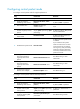
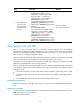
Ste
p
Command
Remarks
1. Enter system view.
system-view N/A
2. Associating Track with
interface management.
• Create a track entry, associate it with
the interface management module to
monitor the physical status of an
interface, and specify the delay time for
the Track module to notify the
associated application module when
the track entry status changes:
track track-entry-number interface
interface-type interface-number [ delay
{ negative negative-time | positive
positive-time } * ]
• Create a track entry, associate it with
the interface management module to
monitor the Layer 3 protocol status of
an interface, and specify the delay time
for the Track module to notify the
associated application module when
the track entry status changes:
track track-entry-number interface
interface-type interface-number
protocol { ipv4 | ipv6 } [ delay
{ negative negative-time | positive
positive-time } * ]
Use either method.
No track entry is created by
default.