
R21xx-HP FlexFabric 11900 High Availability Configuration Guide

73
Associating the Track module with an application
module
Associating Track with VRRP
VRRP is an error-tolerant protocol. It adds a group of routers that can act as network gateways to a VRRP
group, which forms a virtual router. Depending on their priority level, routers in the VRRP group elect the
master router to act as the gateway. A router with a higher priority is more likely to become the master.
The other routers function as the backups. When the master fails, the backups in the VRRP group elect a
new master from among them. This makes sure the hosts in the network segment can communicate with
external networks without interruption. For more information about VRRP, see "Configuring VRRP."
Associate the Track module with the VRRP group to implement the following actions:
• Change the priority of a router according to the status of the uplink. If a fault occurs on the uplink
of the router, the VRRP group is not aware of the uplink failure. If the router is the master, hosts in the
LAN cannot access the external network. This problem can be solved by establishing a track-VRRP
group association. Use the detection modules to monitor the status of the uplink of the router and
establish collaborations between the detection modules, track module and VRRP. When the uplink
fails, the detection modules notify the Track module to change the status of the monitored track entry
to Negative, and the priority of the master decreases by a user-specified value. This allows a higher
priority router in the VRRP group to become the master, and maintains proper communication
between the hosts in the LAN and the external network.
• Monitor the master on a backup. If a fault occurs on the master, the backup operating in switchover
mode will switch to the master immediately to maintain normal communication.
Follow these guidelines when you associate Track with VRRP:
• VRRP tracking is not valid on an IP address owner. An IP address owner refers to a router when the
IP address of the virtual router is the IP address of an interface on the router in the VRRP group.
• When the status of the track entry changes from Negative to Positive or NotReady, the associated
router restores its priority automatically.
• You can associate a nonexistent track entry with a VRRP group. The association takes effect only
after you use the track command to create the track entry.
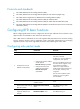
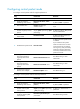
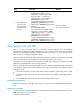
To associate Track with VRRP group:
Ste
p
Command
Remarks
1. Enter system view.
system-view N/A
2. Enter interface view.
interface interface-type
interface-number
N/A
3. Associate a track entry with a
VRRP group.
vrrp [ ipv6 ] vrid virtual-router-id
track track-entry-number [ reduced
priority-reduced | switchover ]
No track entry is specified for a
VRRP group by default.