
R21xx-HP FlexFabric 11900 High Availability Configuration Guide

76
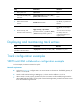
Step Command Remarks
1. Enter system view.
system-view N/A
2. Create a policy or policy
node and enter PBR policy
node view.
policy-based-route policy-name [ deny |
permit ] node node-number
N/A
3. Define an ACL match
criterion.
if-match acl acl-number
By default, no packets are
filtered.
4. Set the next hop, and
associate it with a track entry
apply next-hop [ vpn-instance
vpn-instance-name ] { ip-address [ direct ]
[ track track-entry-number ] }&<1-2>
By default, no next hop is
set.
You can set two next hops
for backup. The one
configured earlier has a
higher priority.
Displaying and maintaining track entries
Task Command Remarks
Display information about the
specified or all track entries.
display track { track-entry-number | all }
Available in any view.
Track configuration examples
VRRP-Track-NQA collaboration configuration example
In this example, the master monitors the uplink.
Network requirements
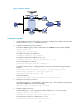
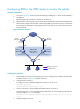
• As shown in Figure 21, configure Host A to access Host B on the Internet. The default gateway of
H o s t A i s 10 .1.1.10 / 24 .
• Switch A and Switch B belong to VRRP group 1, whose virtual IP address is 10.1.1.10.
• When Switch A works properly, packets from Host A to Host B are forwarded through Switch A.
When VRRP finds that a fault is on the uplink of Switch A through NQA, packets from Host A to Host
B are forwarded through Switch B.