
R21xx-HP FlexFabric 11900 High Availability Configuration Guide

80
Configuring BFD for a VRRP backup to monitor the master
Network requirements
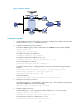
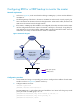
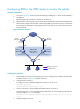
• As shown in Figure 22, Switch A and Switch B belong to VRRP group 1, whose virtual IP address is
192.168.0.10.
• The default gateway of the hosts in the LAN is 192.168.0.10. When Switch A works properly, the
hosts in the LAN access the external network through Switch A. When Switch A fails, the hosts in the
LAN access the external network through Switch B.
• If the master in a VRRP group fails and BFD is not configured, the backup cannot become the master
until the configured timeout timer expires. The timeout is usually 3 to 4 seconds, a long delay for
most applications. To solve this problem, VRRP uses BFD to probe the state of the master. Once the
master fails, the backup can become the new master in milliseconds.
Figure 22 Network diagram
Configuration procedure
1. Create VLANs and assign corresponding ports to them. Configure the IP address of each VLAN
interface as shown in Figure 22. (Details not shown.)
2. Configure VRRP on Switch A:
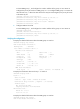
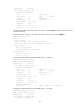
<SwitchA> system-view
[SwitchA] interface vlan-interface 2
# Create VRRP group 1, and configure the virtual IP address 192.168.0.10 for the group. Set the
priority of Switch A in VRRP group 1 to 110.
[SwitchA-Vlan-interface2] vrrp vrid 1 virtual-ip 192.168.0.10
[SwitchA-Vlan-interface2] vrrp vrid 1 priority 110
[SwitchA-Vlan-interface2] return
Internet
Virtual router
Virtual IP address:
192.168.0.10
Vlan-int2
192.168.0.101/24
Vlan-int2
192.168.0.102/24
Switch A
Master
Switch B
Backup
L2 switch
VRRP packets
BFD probe packets