
R21xx-HP FlexFabric 11900 High Availability Configuration Guide
84
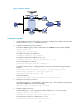
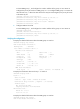
# Create VRRP group 1, and configure the virtual IP address of the group as 192.168.0.10.
Configure the priority of Switch A in VRRP group 1 as 110. Configure VRRP group 1 to monitor the
status of track entry 1. When the status of the track entry becomes Negative, the priority of Switch
A decreases by 20.
[SwitchA] interface vlan-interface 2
[SwitchA-Vlan-interface2] vrrp vrid 1 virtual-ip 192.168.0.10
[SwitchA-Vlan-interface2] vrrp vrid 1 priority 110
[SwitchA-Vlan-interface2] vrrp vrid 1 track 1 reduced 20
[SwitchA-Vlan-interface2] return
5. Configure VRRP on Switch B:
# Create VRRP group 1, and configure the virtual IP address of the group as 192.168.0.10.
<SwitchB> system-view
[SwitchB] interface vlan-interface 2
[SwitchB-Vlan-interface2] vrrp vrid 1 virtual-ip 192.168.0.10
[SwitchB-Vlan-interface2] return
Verifying the configuration
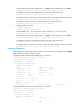
# Display the detailed information about the VRRP group on Switch A.
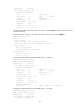
<SwitchA> display vrrp verbose
IPv4 Virtual Router Information:
Running Mode : Standard
Total number of virtual routers : 1
Interface Vlan-interface2
VRID : 1 Adver Timer : 100
Admin Status : Up State : Master
Config Pri : 110 Running Pri : 110
Preempt Mode : Yes Delay Time : 0
Auth Type : None
Virtual IP : 192.168.0.10
Virtual MAC : 0000-5e00-0101
Master IP : 192.168.0.101
VRRP Track Information:
Track Object : 1 State : Positive Pri Reduced : 20
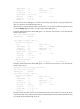
# Display the information about track entry 1 on Switch A.
<SwitchA> display track 1
Track ID: 1
State: Positive
Duration: 0 days 0 hours 0 minutes 32 seconds
Notification delay: Positive 0, Negative 0 (in seconds)
Tracked object:
BFD session mode: Echo
Outgoing interface: Vlan-interface2
VPN instance name: -
Remote IP: 1.1.1.2
Local IP: 1.1.1.1
# Display the detailed information about the VRRP group on Switch B.
<SwitchB> display vrrp verbose
IPv4 Virtual Router Information: