
R21xx-HP FlexFabric 11900 IP Multicast Command Reference
24
Examples
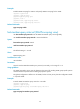
# Enable IGMP snooping for VLAN 2 and specify IGMPv3 snooping for the VLAN.
<Sysname> system-view
[Sysname] igmp-snooping
[Sysname-igmp-snooping] quit
[Sysname] vlan 2
[Sysname-vlan2] igmp-snooping enable
[Sysname-vlan2] igmp-snooping version 3
Related commands
igmp-snooping enable
last-member-query-interval (IGMP-snooping view)
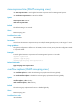
Use last-member-query-interval to set the IGMP last-member query interval globally.
Use undo last-member-query-interval to restore the default.
Syntax
last-member-query-interval interval
undo last-member-query-interval
Default
The default setting is 1 second.
Views
IGMP-snooping view
Predefined user roles
network-admin
Parameters
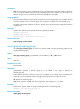
interval: Sets the IGMP last-member query interval (in seconds), in the range of 1 to 5.
Usage guidelines
The IGMP last-member query interval determines the interval for sending IGMP group-specific queries
and the maximum response time for IGMP group-specific queries.
The global configuration is effective on all VLANs, but has a lower priority than the configuration made
in a specific VLAN.
Examples
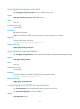
# Set the IGMP last-member query interval to 3 seconds.
<Sysname> system-view
[Sysname] igmp-snooping
[Sysname-igmp-snooping] last-member-query-interval 3
Related commands
igmp-snooping last-member-query-interval