
R21xx-HP FlexFabric 11900 IP Multicast Command Reference
75
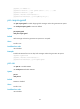
Views
Interface view
Predefined user roles
network-admin
Usage guidelines
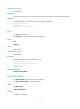
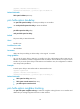
This feature does not take effect unless you enable PIM-DM or PIM-SM on an interface before you
configure this feature.
Examples
# Enable IP multicast routing, enable PIM-DM on VLAN-interface 100, and enable PIM to work with BFD
on the interface.
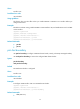
<Sysname> system-view
[Sysname] multicast routing-enable
[Sysname] interface vlan-interface 100
[Sysname-Vlan-interface100] pim dm
[Sysname-Vlan-interface100] pim bfd enable
Related commands
• pim dm
• pim sm
pim bsr-boundary
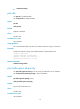
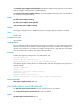
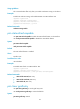
Use pim bsr-boundary to configure a PIM-SM domain border, namely, a bootstrap message boundary.
Use undo pim bsr-boundary to remove the configured PIM domain border.
Syntax
pim bsr-boundary
undo pim bsr-boundary
Default
No PIM domain border is configured.
Views
Interface view
Predefined user roles
network-admin
Examples
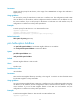
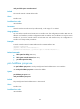
# Configure VLAN-interface 100 as a PIM-SM domain border.
<Sysname> system-view
[Sysname] interface vlan-interface 100
[Sysname-Vlan-interface100] pim bsr-boundary
Related commands
• c-bsr (PIM view)