
R21xx-HP FlexFabric 11900 IP Multicast Command Reference

89
spt-switch-threshold (PIM view)
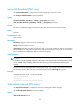
Use spt-switch-threshold to configure the criteria for triggering a switchover to SPT.
Use undo spt-switch-threshold to restore the default.
Syntax
spt-switch-threshold { immediacy | infinity } [ group-policy acl-number ]
undo spt-switch-threshold [ immediacy | infinity ] [ group-policy acl-number ]
Default
The device immediately triggers a switchover to SPT after receiving the first multicast packet.
Views
PIM view
Predefined user roles
network-admin
Parameters
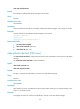
immediacy: Triggers a switchover to SPT immediately.
infinity: Disables switchover to SPT.
group-policy acl-number: Specifies an IPv4 basic ACL, in the range of 2000 to 2999. If an IPv4 basic
ACL is specified, the configuration applies to the multicast groups that the ACL permits. If no IPv4 basic
ACL is specified, the configuration applies to all multicast groups.
Usage guidelines
CAUTION:
If the device is an RP, disablin
g
switchover to SPT mi
g
ht cause multicast traffic forwardin
g
failures on the
source-side DR. When disabling switchover to SPT, be sure you fully understand its impact on your
network.
The source field in an ACL specifies the multicast group range. If you specify a VPN instance in the ACL,
the ACL does not take effect. The other optional parameters except time-range are ignored.
Examples
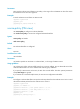
# Disable switchover to SPT on a receiver-side DR.
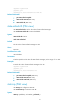
<Sysname> system-view
[Sysname] pim
[Sysname-pim] spt-switch-threshold infinity
state-refresh-interval (PIM view)
Use state-refresh-interval to configure the interval for sending state refresh messages.
Use undo state-refresh-interval to restore the default.
Syntax
state-refresh-interval interval