
R21xx-HP FlexFabric 11900 IP Multicast Configuration Guide
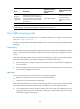

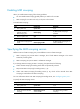
Table Of Contents
- Title Page
- Contents
- Multicast overview
- Configuring IGMP snooping
- Overview
- IGMP snooping configuration task list
- Configuring basic IGMP snooping functions
- Configuring IGMP snooping port functions
- Configuring IGMP snooping policies
- Displaying and maintaining IGMP snooping
- IGMP snooping configuration examples
- Troubleshooting IGMP snooping
- Configuring multicast routing and forwarding
- Configuring IGMP
- Configuring PIM
- Overview
- Configuring PIM-DM
- Configuring PIM-SM
- Configuring common PIM features
- Displaying and maintaining PIM
- PIM configuration examples
- Troubleshooting PIM
- Configuring MLD snooping
- Overview
- MLD snooping configuration task list
- Configuring basic MLD snooping functions
- Configuring MLD snooping port functions
- Configuring MLD snooping policies
- Displaying and maintaining MLD snooping
- MLD snooping configuration examples
- Troubleshooting MLD snooping
- Configuring IPv6 multicast routing and forwarding
- Configuring MLD
- Configuring IPv6 PIM
- PIM overview
- Configuring IPv6 PIM-DM
- Configuring IPv6 PIM-SM
- Configuring common IPv6 PIM features
- Displaying and maintaining IPv6 PIM
- IPv6 PIM configuration examples
- Troubleshooting IPv6 PIM
- Support and other resources
- Index
111
Setting the maximum number of MLD snooping forwarding
entries
You can modify the maximum number of MLD snooping forwarding entries. When the number of
forwarding entries on the device reaches the upper limit, the device does not automatically remove any
existing entries or create new entries until some entries time out or are removed. In this case, HP
recommends that you manually remove excessive entries.
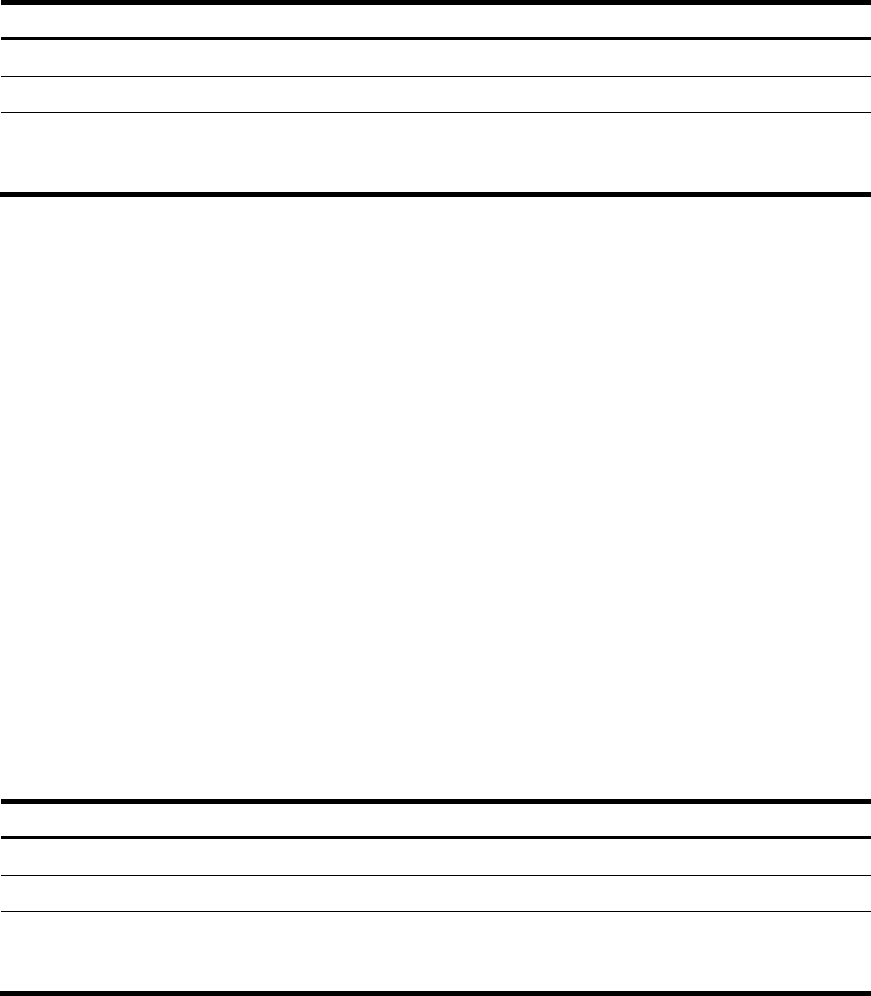
To set the maximum number of MLD snooping forwarding entries:
Ste
p
Command
Remarks
1. Enter system view.
system-view N/A
2. Enter MLD-snooping view.
mld-snooping
N/A
3. Set the maximum number of
MLD snooping forwarding
entries.
entry-limit limit
The default setting is
4294967295.
Configuring parameters for MLD queries and responses
When a multicast listening host receives an MLD query (general query or multicast-address-specific
query), it starts a timer for each IPv6 multicast group that it has joined. This timer is initialized to a
random value in the range of 0 to the maximum response delay advertised in the MLD query message.
When the timer value decreases to 0, the host sends an MLD report to the IPv6 multicast group.
To speed up the response of hosts to MLD queries and avoid simultaneous timer expirations causing MLD
report traffic bursts, you must correctly set the maximum response delay.
• The maximum response delay for MLD general queries is set by the max-response-time command.
• The maximum response delay for MLD multicast-address-specific queries is the same as the MLD
last-listener query interval, which is set by the last-listener-query-interval command.
You can configure parameters for MLD queries and responses either for the current VLAN in VLAN view
or globally for all VLANs in MLD-snooping view. If the configurations are made in both VLAN view and
MLD-snooping view, the configuration made in VLAN view takes priority.
Configuring parameters for MLD queries and responses globally
Ste
p
Command
Remarks
1. Enter system view.
system-view N/A
2. Enter MLD-snooping view.
mld-snooping N/A
3. Set the maximum response
delay for MLD general
queries.
max-response-time interval The default setting is 10 seconds.