
R21xx-HP FlexFabric 11900 IP Multicast Configuration Guide
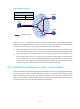
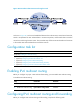
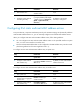
Table Of Contents
- Title Page
- Contents
- Multicast overview
- Configuring IGMP snooping
- Overview
- IGMP snooping configuration task list
- Configuring basic IGMP snooping functions
- Configuring IGMP snooping port functions
- Configuring IGMP snooping policies
- Displaying and maintaining IGMP snooping
- IGMP snooping configuration examples
- Troubleshooting IGMP snooping
- Configuring multicast routing and forwarding
- Configuring IGMP
- Configuring PIM
- Overview
- Configuring PIM-DM
- Configuring PIM-SM
- Configuring common PIM features
- Displaying and maintaining PIM
- PIM configuration examples
- Troubleshooting PIM
- Configuring MLD snooping
- Overview
- MLD snooping configuration task list
- Configuring basic MLD snooping functions
- Configuring MLD snooping port functions
- Configuring MLD snooping policies
- Displaying and maintaining MLD snooping
- MLD snooping configuration examples
- Troubleshooting MLD snooping
- Configuring IPv6 multicast routing and forwarding
- Configuring MLD
- Configuring IPv6 PIM
- PIM overview
- Configuring IPv6 PIM-DM
- Configuring IPv6 PIM-SM
- Configuring common IPv6 PIM features
- Displaying and maintaining IPv6 PIM
- IPv6 PIM configuration examples
- Troubleshooting IPv6 PIM
- Support and other resources
- Index

128
Figure 40 IPv6 multicast data transmission through a tunnel
As shown in Figure 40, with a tunnel established between the multicast routers Switch A and Switch B,
Switch A encapsulates the IPv6 multicast data in unicast IPv6 packets, and forwards them to Switch B
across the tunnel through unicast routers. Then, Switch B strips off the unicast IPv6 header and continues
to forward the IPv6 multicast data down toward the receivers.
Configuration task list
Tasks at a
g
lance
(Required.) Enabling IPv6 multicast routing
(Optional.) Configuring IPv6 multicast routing and forwarding
• (Optional.) Configuring the RPF route selection rule
• (Optional.) Configuring IPv6 multicast load splitting
• (Optional.) Configuring an IPv6 multicast forwarding boundary
• (Optional.) Configuring IPv6 static multicast MAC address entries
Enabling IPv6 multicast routing
Before you configure any Layer 3 IPv6 multicast functionality, you must enable IPv6 multicast routing.
To enable IPv6 multicast routing:
Ste
p
Command
Remarks
1. Enter system view.
system-view N/A
2. Enable IPv6 multicast routing.
ipv6 multicast routing-enable
By default, IPv6 multicast routing is
disabled.
Configuring IPv6 multicast routing and forwarding
Before you configure IPv6 multicast routing and forwarding, complete the following tasks: