
R21xx-HP FlexFabric 11900 IP Multicast Configuration Guide
Table Of Contents
- Title Page
- Contents
- Multicast overview
- Configuring IGMP snooping
- Overview
- IGMP snooping configuration task list
- Configuring basic IGMP snooping functions
- Configuring IGMP snooping port functions
- Configuring IGMP snooping policies
- Displaying and maintaining IGMP snooping
- IGMP snooping configuration examples
- Troubleshooting IGMP snooping
- Configuring multicast routing and forwarding
- Configuring IGMP
- Configuring PIM
- Overview
- Configuring PIM-DM
- Configuring PIM-SM
- Configuring common PIM features
- Displaying and maintaining PIM
- PIM configuration examples
- Troubleshooting PIM
- Configuring MLD snooping
- Overview
- MLD snooping configuration task list
- Configuring basic MLD snooping functions
- Configuring MLD snooping port functions
- Configuring MLD snooping policies
- Displaying and maintaining MLD snooping
- MLD snooping configuration examples
- Troubleshooting MLD snooping
- Configuring IPv6 multicast routing and forwarding
- Configuring MLD
- Configuring IPv6 PIM
- PIM overview
- Configuring IPv6 PIM-DM
- Configuring IPv6 PIM-SM
- Configuring common IPv6 PIM features
- Displaying and maintaining IPv6 PIM
- IPv6 PIM configuration examples
- Troubleshooting IPv6 PIM
- Support and other resources
- Index
142
Ste
p
Command Remarks
2. Enter interface view.
interface interface-type
interface-number
N/A
3. Configure an IPv6 multicast
group filter.
mld group-policy acl6-number
[ version-number ]
By default, no IPv6 group filter is
configured on the interface. Hosts
on the current interface can join
any multicast group.
NOTE:
If you configure the interface as a static member interface for an IPv6 multicast group or an IPv6 multicas
t
source and group, this configuration is not effective for the IPv6 multicast group or the IPv6 multicast
source and group.
Adjusting MLD performance
Before adjusting MLD performance, complete the following tasks:
• Enable IPv6 forwarding and configure an IPv6 unicast routing protocol so that all devices can be
interoperable at the network layer.
• Configure basic MLD functions.
Enabling MLD fast-leave processing
In some applications, such as ADSL dial-up networking, only one multicast receiver host is attached to an
interface of the MLD querier. To allow fast response to the MLD done messages of the host when it
switches frequently from one IPv6 multicast group to another, you can enable fast-leave processing on the
MLD querier.
With MLD fast-leave processing enabled, after receiving an MLD done message from a host, the MLD
querier sends a leave notification to the upstream immediately without first sending MLD
multicast-address-specific queries. This reduces leave latency and preserves the network bandwidth.
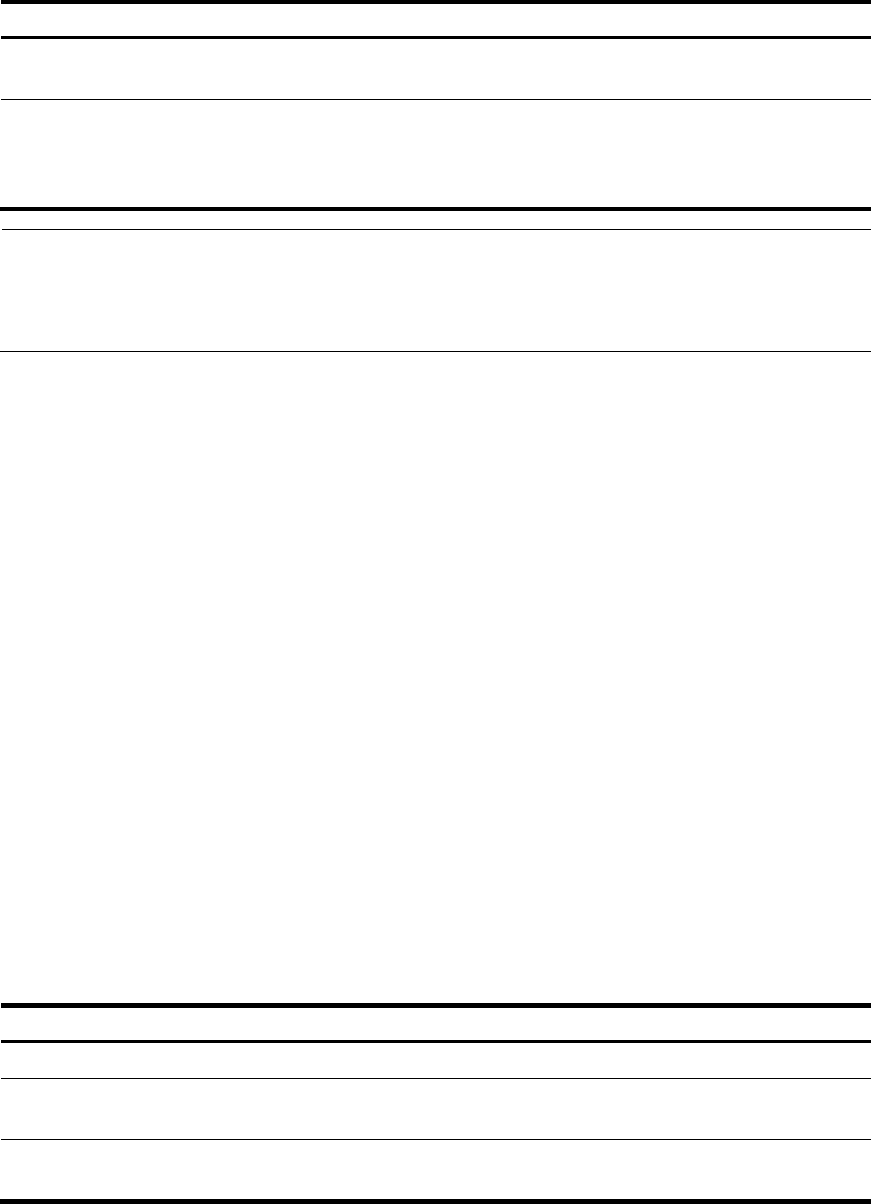
To enable MLD fast-leave processing:
Ste
p
Command Remarks
1. Enter system view.
system-view
N/A
2. Enter interface view.
interface interface-type
interface-number
N/A
3. Enable MLD fast-leave
processing.
mld fast-leave [ group-policy
acl6-number ]
By default, the MLD fast-leave
processing is disabled.