
R21xx-HP FlexFabric 11900 IP Multicast Configuration Guide
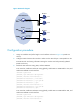
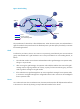

Table Of Contents
- Title Page
- Contents
- Multicast overview
- Configuring IGMP snooping
- Overview
- IGMP snooping configuration task list
- Configuring basic IGMP snooping functions
- Configuring IGMP snooping port functions
- Configuring IGMP snooping policies
- Displaying and maintaining IGMP snooping
- IGMP snooping configuration examples
- Troubleshooting IGMP snooping
- Configuring multicast routing and forwarding
- Configuring IGMP
- Configuring PIM
- Overview
- Configuring PIM-DM
- Configuring PIM-SM
- Configuring common PIM features
- Displaying and maintaining PIM
- PIM configuration examples
- Troubleshooting PIM
- Configuring MLD snooping
- Overview
- MLD snooping configuration task list
- Configuring basic MLD snooping functions
- Configuring MLD snooping port functions
- Configuring MLD snooping policies
- Displaying and maintaining MLD snooping
- MLD snooping configuration examples
- Troubleshooting MLD snooping
- Configuring IPv6 multicast routing and forwarding
- Configuring MLD
- Configuring IPv6 PIM
- PIM overview
- Configuring IPv6 PIM-DM
- Configuring IPv6 PIM-SM
- Configuring common IPv6 PIM features
- Displaying and maintaining IPv6 PIM
- IPv6 PIM configuration examples
- Troubleshooting IPv6 PIM
- Support and other resources
- Index
143
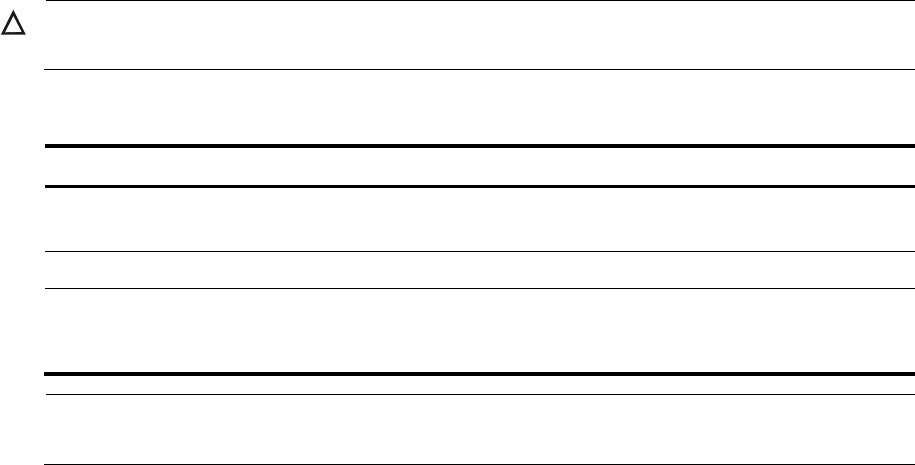
Displaying and maintaining MLD
CAUTION:
The reset mld group command might cause IPv6 multicast data transmission failures.
Execute display commands in any view and reset command in user view.
Task Command
Display MLD group information.
display mld group [ ipv6-group-address | interface interface-type
interface-number ] [ static | verbose ]
Display MLD information.
display mld interface [ interface-type interface-number ] [ verbose ]
Remove all the dynamic group
entries of a specified MLD group
or all MLD groups.
reset mld group { all | interface interface-type interface-number { all |
ipv6-group-address [ prefix-length ] [ ipv6-source-address
[ prefix-length ] ] } }
NOTE:
The reset mld group command cannot remove static MLD group entries.
MLD configuration examples
Network requirements
VOD streams are sent to receiver hosts in multicast. Receiver hosts of different organizations form stub
networks N1 and N2. Host A and Host C are multicast receiver hosts in N1 and N2, respectively.
MLDv1 runs between Switch A and N1, and between the other two switches (Switch B and Switch C) and
N2. Switch A acts as the MLD querier in N1. Switch B acts as the MLD querier in N2 because it has a
lower IPv6 address.
The hosts in N1 can join only the IPv6 multicast group FF1E::101. The hosts in N2 can join any IPv6
multicast groups.