
R21xx-HP FlexFabric 11900 IP Multicast Configuration Guide
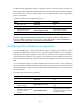
Table Of Contents
- Title Page
- Contents
- Multicast overview
- Configuring IGMP snooping
- Overview
- IGMP snooping configuration task list
- Configuring basic IGMP snooping functions
- Configuring IGMP snooping port functions
- Configuring IGMP snooping policies
- Displaying and maintaining IGMP snooping
- IGMP snooping configuration examples
- Troubleshooting IGMP snooping
- Configuring multicast routing and forwarding
- Configuring IGMP
- Configuring PIM
- Overview
- Configuring PIM-DM
- Configuring PIM-SM
- Configuring common PIM features
- Displaying and maintaining PIM
- PIM configuration examples
- Troubleshooting PIM
- Configuring MLD snooping
- Overview
- MLD snooping configuration task list
- Configuring basic MLD snooping functions
- Configuring MLD snooping port functions
- Configuring MLD snooping policies
- Displaying and maintaining MLD snooping
- MLD snooping configuration examples
- Troubleshooting MLD snooping
- Configuring IPv6 multicast routing and forwarding
- Configuring MLD
- Configuring IPv6 PIM
- PIM overview
- Configuring IPv6 PIM-DM
- Configuring IPv6 PIM-SM
- Configuring common IPv6 PIM features
- Displaying and maintaining IPv6 PIM
- IPv6 PIM configuration examples
- Troubleshooting IPv6 PIM
- Support and other resources
- Index

168
Configuring switchover to SPT
CAUTION:
If the router is an RP, disablin
g
switchover to SPT mi
g
ht cause multicast traffic forwardin
g
failures on the
source-side DR. When disabling switchover to SPT, be sure you fully understand its impact on your
network.
To configure the criteria for triggering a switchover to SPT:
Ste
p
Command Remarks
1. Enter system view.
system-view
N/A
2. Enter IPv6 PIM view.
ipv6 pim N/A
3. Configure the criteria for
triggering a switchover to SPT.
spt-switch-threshold { immediacy |
infinity } [ group-policy
acl6-number ]
By default, both the receiver-side
DR and RP immediately trigger a
switchover to SPT after receiving
the first multicast packet.
Configuring common IPv6 PIM features
Configuration task list
Task at a
g
lance
(Optional.) Configuring an IPv6 multicast data filter
(Optional.) Configuring a hello message filter
(Optional.) Configuring IPv6 PIM hello message options
(Optional.) Configuring common IPv6 PIM timers
(Optional.) Setting the maximum size of each join or prune message
(Optional.) Enabling IPv6 PIM to work with BFD
Configuration prerequisites
Before you configure common IPv6 PIM features, complete the following tasks:
• Configure an IPv6 unicast routing protocol so that all devices in the domain are interoperable at the
network layer.
• Configure IPv6 PIM-DM or IPv6 PIM-SM.