
R21xx-HP FlexFabric 11900 IP Multicast Configuration Guide
Table Of Contents
- Title Page
- Contents
- Multicast overview
- Configuring IGMP snooping
- Overview
- IGMP snooping configuration task list
- Configuring basic IGMP snooping functions
- Configuring IGMP snooping port functions
- Configuring IGMP snooping policies
- Displaying and maintaining IGMP snooping
- IGMP snooping configuration examples
- Troubleshooting IGMP snooping
- Configuring multicast routing and forwarding
- Configuring IGMP
- Configuring PIM
- Overview
- Configuring PIM-DM
- Configuring PIM-SM
- Configuring common PIM features
- Displaying and maintaining PIM
- PIM configuration examples
- Troubleshooting PIM
- Configuring MLD snooping
- Overview
- MLD snooping configuration task list
- Configuring basic MLD snooping functions
- Configuring MLD snooping port functions
- Configuring MLD snooping policies
- Displaying and maintaining MLD snooping
- MLD snooping configuration examples
- Troubleshooting MLD snooping
- Configuring IPv6 multicast routing and forwarding
- Configuring MLD
- Configuring IPv6 PIM
- PIM overview
- Configuring IPv6 PIM-DM
- Configuring IPv6 PIM-SM
- Configuring common IPv6 PIM features
- Displaying and maintaining IPv6 PIM
- IPv6 PIM configuration examples
- Troubleshooting IPv6 PIM
- Support and other resources
- Index
18
Enabling IGMP snooping
When you enable IGMP snooping, follow these guidelines:
• You must enable IGMP snooping globally before you enable it for a VLAN.
• IGMP snooping for a VLAN takes effect only on the ports in that VLAN.
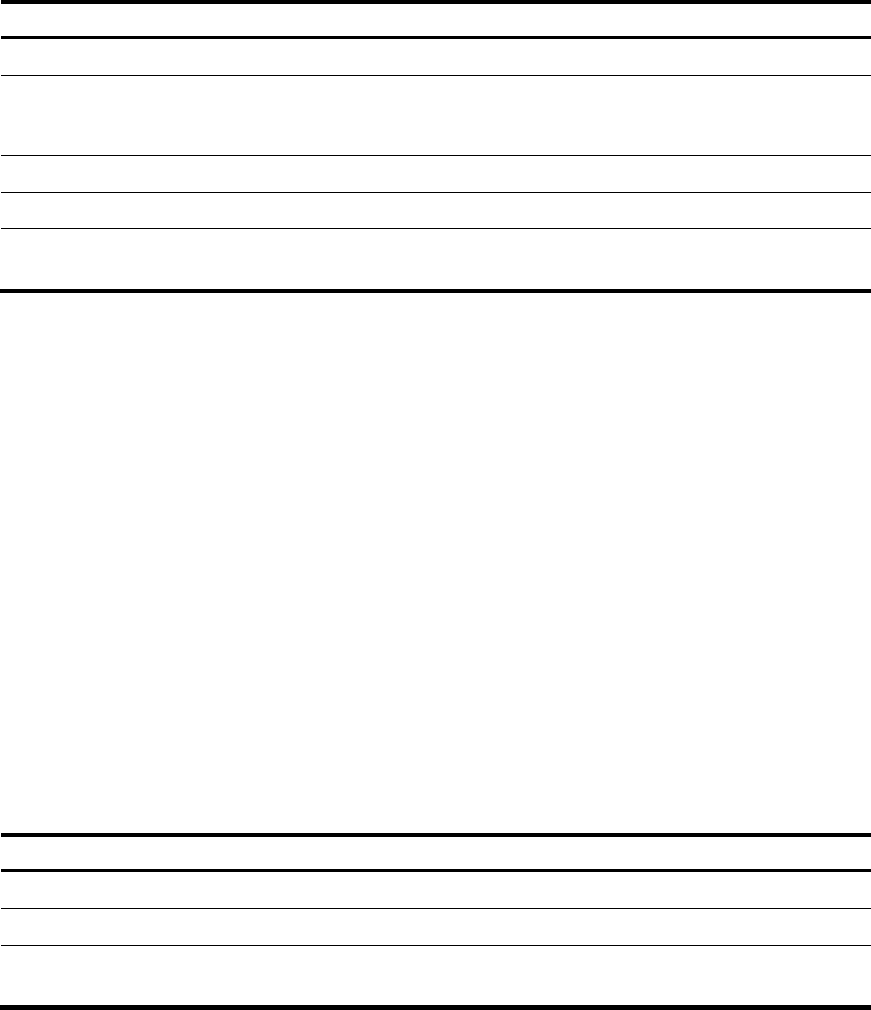
To enable IGMP snooping:
Ste
p
Command
Remarks
1. Enter system view.
system-view
N/A
2. Enable IGMP snooping
globally and enter
IGMP-snooping view.
igmp-snooping
By default, IGMP snooping is
disabled.
3. Return to system view.
quit N/A
4. Enter VLAN view.
vlan vlan-id N/A
5. Enable IGMP snooping for the
VLAN.
igmp-snooping enable
By default, IGMP snooping for a
VLAN is disabled.
Specifying the IGMP snooping version
Different versions of IGMP snooping can process different versions of IGMP messages.
• IGMPv2 snooping can process IGMPv1 and IGMPv2 messages, but it floods IGMPv3 messages in
the VLAN instead of processing them.
• IGMPv3 snooping can process IGMPv1, IGMPv2, and IGMPv3 messages.
If you change IGMPv3 snooping to IGMPv2 snooping, the device does the following:
• Clears all IGMP snooping forwarding entries that are dynamically added.
• Keeps static IGMPv3 snooping forwarding entries (*, G).
• Clears static IGMPv3 snooping forwarding entries (S, G), which will be restored when IGMP
snooping is switched back to IGMPv3 snooping.
For more information about static IGMP snooping forwarding entries, see "Configuring static ports."
T
o specify the IGMP snooping version:
Ste
p
Command
Remarks
1. Enter system view.
system-view
N/A
2. Enter VLAN view.
vlan vlan-id N/A
3. Specify the version of IGMP
snooping.
igmp-snooping version
version-number
The default setting is IGMPv2
snooping.