
R21xx-HP FlexFabric 11900 IP Multicast Configuration Guide
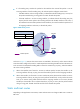
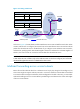
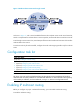
Table Of Contents
- Title Page
- Contents
- Multicast overview
- Configuring IGMP snooping
- Overview
- IGMP snooping configuration task list
- Configuring basic IGMP snooping functions
- Configuring IGMP snooping port functions
- Configuring IGMP snooping policies
- Displaying and maintaining IGMP snooping
- IGMP snooping configuration examples
- Troubleshooting IGMP snooping
- Configuring multicast routing and forwarding
- Configuring IGMP
- Configuring PIM
- Overview
- Configuring PIM-DM
- Configuring PIM-SM
- Configuring common PIM features
- Displaying and maintaining PIM
- PIM configuration examples
- Troubleshooting PIM
- Configuring MLD snooping
- Overview
- MLD snooping configuration task list
- Configuring basic MLD snooping functions
- Configuring MLD snooping port functions
- Configuring MLD snooping policies
- Displaying and maintaining MLD snooping
- MLD snooping configuration examples
- Troubleshooting MLD snooping
- Configuring IPv6 multicast routing and forwarding
- Configuring MLD
- Configuring IPv6 PIM
- PIM overview
- Configuring IPv6 PIM-DM
- Configuring IPv6 PIM-SM
- Configuring common IPv6 PIM features
- Displaying and maintaining IPv6 PIM
- IPv6 PIM configuration examples
- Troubleshooting IPv6 PIM
- Support and other resources
- Index

35
• If a forwarding entry matches the packet but the interface that received the packet is not the
incoming interface of the forwarding entry, the multicast packet undergoes an RPF check.
{ If the RPF interface is the incoming interface, it indicates that the forwarding entry is correct, but
the packet traveled along a wrong path. The router discards the packet.
{ If the RPF interface is not the incoming interface, it indicates that the forwarding entry has
expired, and the router replaces the incoming interface with the RPF interface. In this case, if
the interface that received the packet is the RPF interface, the router forwards the packet out of
all outgoing interfaces. Otherwise, it discards the packet.
Figure 14 RPF check process
As shown in Figure 14, assume that unicast routes are available in the network, and no static multicast
routes have been configured on Switch C. Multicast packets travel along the SPT from the multicast source
to the receivers. The multicast forwarding table on Switch C contains the (S, G) entry, with Vlan-interface
20 as the incoming interface.
• When Vlan-interface 20 of Switch C receives a multicast packet, because the interface is the
incoming interface of the (S, G) entry, the switch forwards the packet out of all outgoing interfaces.
• When Vlan-interface 10 of Switch C receives a multicast packet, because the interface is not the
incoming interface of the (S, G) entry, the switch performs an RPF check on the packet. The switch
looks up its unicast routing table and finds that the outgoing interface to the source (the RPF
interface) is Vlan-interface 20. It indicates that the (S, G) entry is correct, but the packet traveled
along a wrong path. The RPF check fails and the switch discards the packet.
Static multicast routes
Depending on the application environment, a static multicast route can change an RPF route or create an
RPF route.
Source
192.168.0.1/24
Receiver
Receiver
Switch A
Switch B
Switch C
Vlan-int20
Vlan-int10
Vlan-int10
Multicast packets
Destination/Mask
IP Routing Table on Switch C
192.168.0.0/24
Interface
Vlan-int20