
R21xx-HP FlexFabric 11900 IP Multicast Configuration Guide
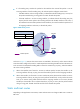
Table Of Contents
- Title Page
- Contents
- Multicast overview
- Configuring IGMP snooping
- Overview
- IGMP snooping configuration task list
- Configuring basic IGMP snooping functions
- Configuring IGMP snooping port functions
- Configuring IGMP snooping policies
- Displaying and maintaining IGMP snooping
- IGMP snooping configuration examples
- Troubleshooting IGMP snooping
- Configuring multicast routing and forwarding
- Configuring IGMP
- Configuring PIM
- Overview
- Configuring PIM-DM
- Configuring PIM-SM
- Configuring common PIM features
- Displaying and maintaining PIM
- PIM configuration examples
- Troubleshooting PIM
- Configuring MLD snooping
- Overview
- MLD snooping configuration task list
- Configuring basic MLD snooping functions
- Configuring MLD snooping port functions
- Configuring MLD snooping policies
- Displaying and maintaining MLD snooping
- MLD snooping configuration examples
- Troubleshooting MLD snooping
- Configuring IPv6 multicast routing and forwarding
- Configuring MLD
- Configuring IPv6 PIM
- PIM overview
- Configuring IPv6 PIM-DM
- Configuring IPv6 PIM-SM
- Configuring common IPv6 PIM features
- Displaying and maintaining IPv6 PIM
- IPv6 PIM configuration examples
- Troubleshooting IPv6 PIM
- Support and other resources
- Index

38
Figure 17 Multicast data transmission through a tunnel
As shown in Figure 17, with a tunnel established between the multicast routers Switch A and Switch B,
Switch A encapsulates the multicast data in unicast IP packets, and forwards them to Switch B across the
tunnel through unicast routers. Then, Switch B strips off the unicast IP header and continues to forward the
multicast data to the receiver.
To use this tunnel only for multicast traffic, configure the tunnel as the outgoing interface only for multicast
routes.
Configuration task list
Tasks at a
g
lance
(Required.) Enabling IP multicast routing
(Optional.) Configuring multicast routing and forwarding
• (Optional.) Configuring static multicast routes
• (Optional.) Configuring the RPF route selection rule
• (Optional.) Configuring multicast load splitting
• (Optional.) Configuring static multicast MAC address entries
NOTE:
The device can route and forward multicast data only through the primary IP addresses of interfaces,
rather than their secondary addresses or unnumbered IP addresses. For more information about primar
y
and secondary IP addresses, and IP unnumbered, see
Layer 3—IP Services Configuration Guide
.
Enabling IP multicast routing
Before you configure any Layer 3 multicast functionality, you must enable IP multicast routing.
To enable IP multicast routing: