
R21xx-HP FlexFabric 11900 IP Multicast Configuration Guide
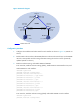
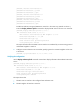
Table Of Contents
- Title Page
- Contents
- Multicast overview
- Configuring IGMP snooping
- Overview
- IGMP snooping configuration task list
- Configuring basic IGMP snooping functions
- Configuring IGMP snooping port functions
- Configuring IGMP snooping policies
- Displaying and maintaining IGMP snooping
- IGMP snooping configuration examples
- Troubleshooting IGMP snooping
- Configuring multicast routing and forwarding
- Configuring IGMP
- Configuring PIM
- Overview
- Configuring PIM-DM
- Configuring PIM-SM
- Configuring common PIM features
- Displaying and maintaining PIM
- PIM configuration examples
- Troubleshooting PIM
- Configuring MLD snooping
- Overview
- MLD snooping configuration task list
- Configuring basic MLD snooping functions
- Configuring MLD snooping port functions
- Configuring MLD snooping policies
- Displaying and maintaining MLD snooping
- MLD snooping configuration examples
- Troubleshooting MLD snooping
- Configuring IPv6 multicast routing and forwarding
- Configuring MLD
- Configuring IPv6 PIM
- PIM overview
- Configuring IPv6 PIM-DM
- Configuring IPv6 PIM-SM
- Configuring common IPv6 PIM features
- Displaying and maintaining IPv6 PIM
- IPv6 PIM configuration examples
- Troubleshooting IPv6 PIM
- Support and other resources
- Index
47
Multicast forwarding over a GRE tunnel
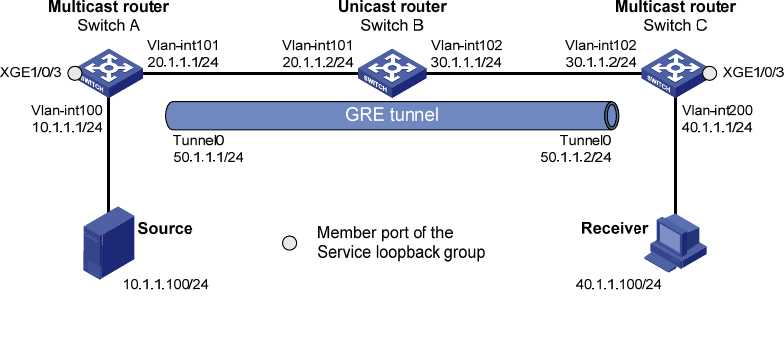
Network requirements
Multicast routing and PIM-DM are enabled on Switch A and Switch C. Switch B does not support
multicast. OSPF is running on Switch A, Switch B, and Switch C.
Perform the configuration so that the receiver host can receive the multicast data from the source.
Figure 20 Network diagram
Configuration procedure
1. Configure the IP address and subnet mask for each interface as shown in Figure 20. (Details not
shown.)
2. Enable OSPF on switches to make sure the network-layer among the switches is interoperable and
the routing information among the switches can be dynamically updated. (Details not shown.)
3. Configure a GRE tunnel:
# Create service loopback group 1 on Switch A and specify its service type as Tunnel.
<SwitchA> system-view
[SwitchA] service-loopback group 1 type tunnel
# Disable STP and LLDP on interface Ten-GigabitEthernet 1/0/3 of Switch A, and add the
interface to service loopback group 1. Ten-GigabitEthernet 1/0/3 does not belong to VLAN 100
or VLAN 101.
[SwitchA] interface ten-gigabitethernet 1/0/3
[SwitchA-Ten-GigabitEthernet1/0/3] undo stp enable
[SwitchA-Ten-GigabitEthernet1/0/3] undo lldp enable
[SwitchA-Ten-GigabitEthernet1/0/3] port service-loopback group 1
[SwitchA-Ten-GigabitEthernet1/0/3] quit
# Create interface Tunnel 0 on Switch A and specify the tunnel encapsulation mode as GRE over
IPv4.
[SwitchA] interface tunnel 0 mode gre
# Configure the IP address for interface Tunnel 0 on Switch A and specify its source and
destination addresses.