
R21xx-HP FlexFabric 11900 IP Multicast Configuration Guide
Table Of Contents
- Title Page
- Contents
- Multicast overview
- Configuring IGMP snooping
- Overview
- IGMP snooping configuration task list
- Configuring basic IGMP snooping functions
- Configuring IGMP snooping port functions
- Configuring IGMP snooping policies
- Displaying and maintaining IGMP snooping
- IGMP snooping configuration examples
- Troubleshooting IGMP snooping
- Configuring multicast routing and forwarding
- Configuring IGMP
- Configuring PIM
- Overview
- Configuring PIM-DM
- Configuring PIM-SM
- Configuring common PIM features
- Displaying and maintaining PIM
- PIM configuration examples
- Troubleshooting PIM
- Configuring MLD snooping
- Overview
- MLD snooping configuration task list
- Configuring basic MLD snooping functions
- Configuring MLD snooping port functions
- Configuring MLD snooping policies
- Displaying and maintaining MLD snooping
- MLD snooping configuration examples
- Troubleshooting MLD snooping
- Configuring IPv6 multicast routing and forwarding
- Configuring MLD
- Configuring IPv6 PIM
- PIM overview
- Configuring IPv6 PIM-DM
- Configuring IPv6 PIM-SM
- Configuring common IPv6 PIM features
- Displaying and maintaining IPv6 PIM
- IPv6 PIM configuration examples
- Troubleshooting IPv6 PIM
- Support and other resources
- Index
77
Ste
p
Command Remarks
2. Enter interface view.
interface interface-type
interface-number
N/A
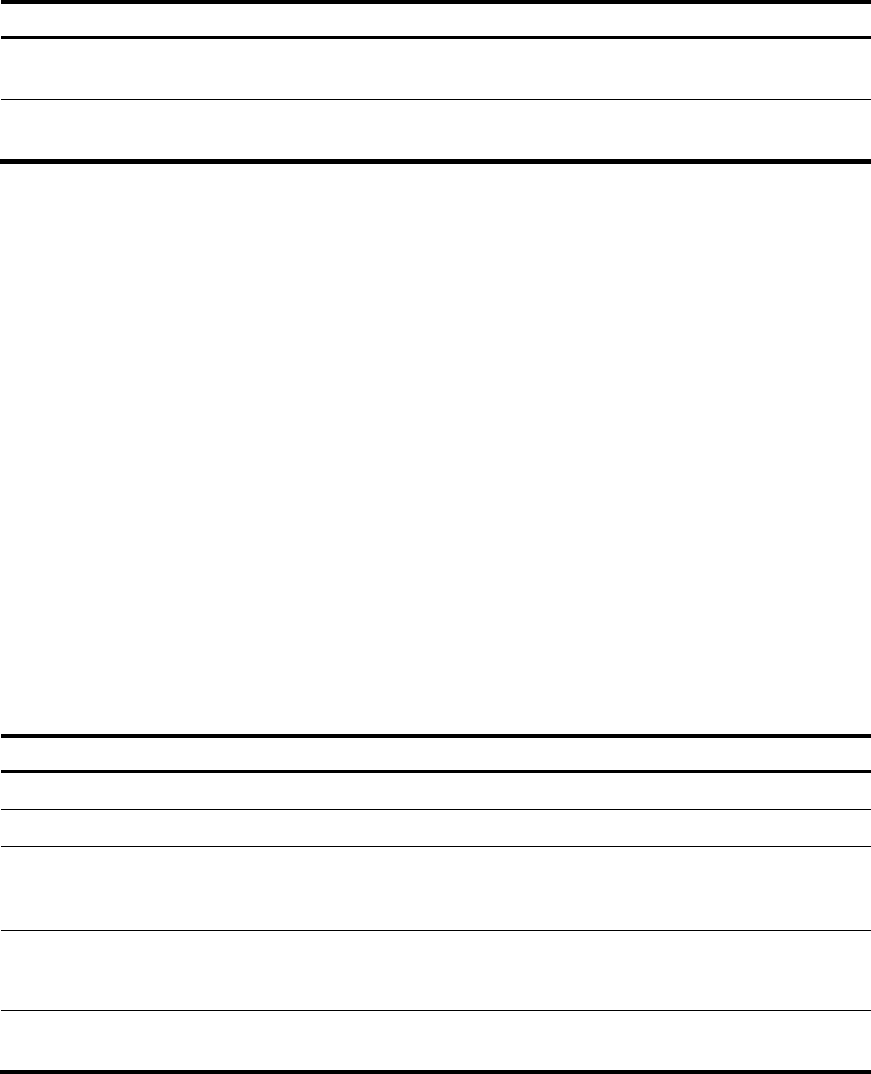
3. Enable the state refresh
feature.
pim state-refresh-capable
By default, the state refresh
feature is enabled.
Configuring state refresh parameters
The router directly connected with the multicast source periodically sends state refresh messages. You can
configure the interval for sending such messages on that router.
A router might receive duplicate state refresh messages within a short time. To prevent this situation, you
can configure the amount of time that the router must wait before it receives next state refresh message.
If the router receives a new state refresh message within the specified waiting time, it discards the
message. If this timer times out, the router accepts a new state refresh message, refreshes its own PIM-DM
state, and resets the waiting timer.
The TTL value of a state refresh message decrements by 1 whenever it passes a router before it is
forwarded to the downstream node until the TTL value comes down to 0. In a small network, a state
refresh message might cycle in the network. To effectively control the propagation scope of state refresh
messages, configure an appropriate TTL value based on the network size on the router directly connected
with the multicast source.
To configure state refresh parameters:
Ste
p
Command Remarks
1. Enter system view.
system-view N/A
2. Enter PIM view.
pim N/A
3. Configure the interval to send state
refresh messages.
state-refresh-interval interval
By default, the interval to send
state refresh messages is 60
seconds.
4. Configure the time to wait before
receiving a new state refresh
message.
state-refresh-rate-limit time
By default, the waiting time is
30 seconds.
5. Configure the TTL value of state
refresh messages.
state-refresh-ttl ttl-value
By default, the TTL value of
state refresh messages is 255.
Configuring PIM-DM graft retry timer
In PIM-DM, graft is the only type of message that uses the acknowledgment mechanism. In a PIM-DM
domain, if a router does not receive a graft-ack message from the upstream router within the specified
time after it sends a graft message, the router keeps sending new graft messages at a configurable
interval known as graft retry timer, until it receives a graft-ack message from the upstream router. For more
information about the configuration of other timers in PIM-DM, see "Configuring common PIM timers."